Skill
What is a Skill?
In the context of AI Agents, a Skill is a reusable task-handling method. It tells an Agent "what to do when it encounters a certain type of task", for example:
- How to plan a trip
- How to process a return ticket
- How to generate a weekly report following company standards
Skills help compensate for the fact that execution experience is hard to accumulate in long-running LLM applications:
- Maintainable: turn stable real-world workflows into structured methods that can be iterated over time.
- On-demand: let the Agent retrieve relevant skills for the current task, instead of placing every workflow into the context.
- Personalized: turn different users' preferences, habits, and constraints into reusable execution methods.
How MemOS Provides Skills for Agents
1. Auto-generate Personalized Skills
MemOS believes "memory is an asset". The solution paths and user preferences accumulated in real conversations are the most valuable raw material for skills.
You do not need to prepare any files. As long as you add the original conversation history between the user and the Agent, MemOS automatically extracts skills from user memories and turns scattered interaction history into reusable, personalized professional capabilities.
2. Upload Custom Skills
MemOS also supports uploading existing skill files directly. Upload a Markdown file or ZIP package to a knowledge base, and MemOS can return relevant skills to the Agent during retrieval.
Auto-generate Personalized Skills
How It Works
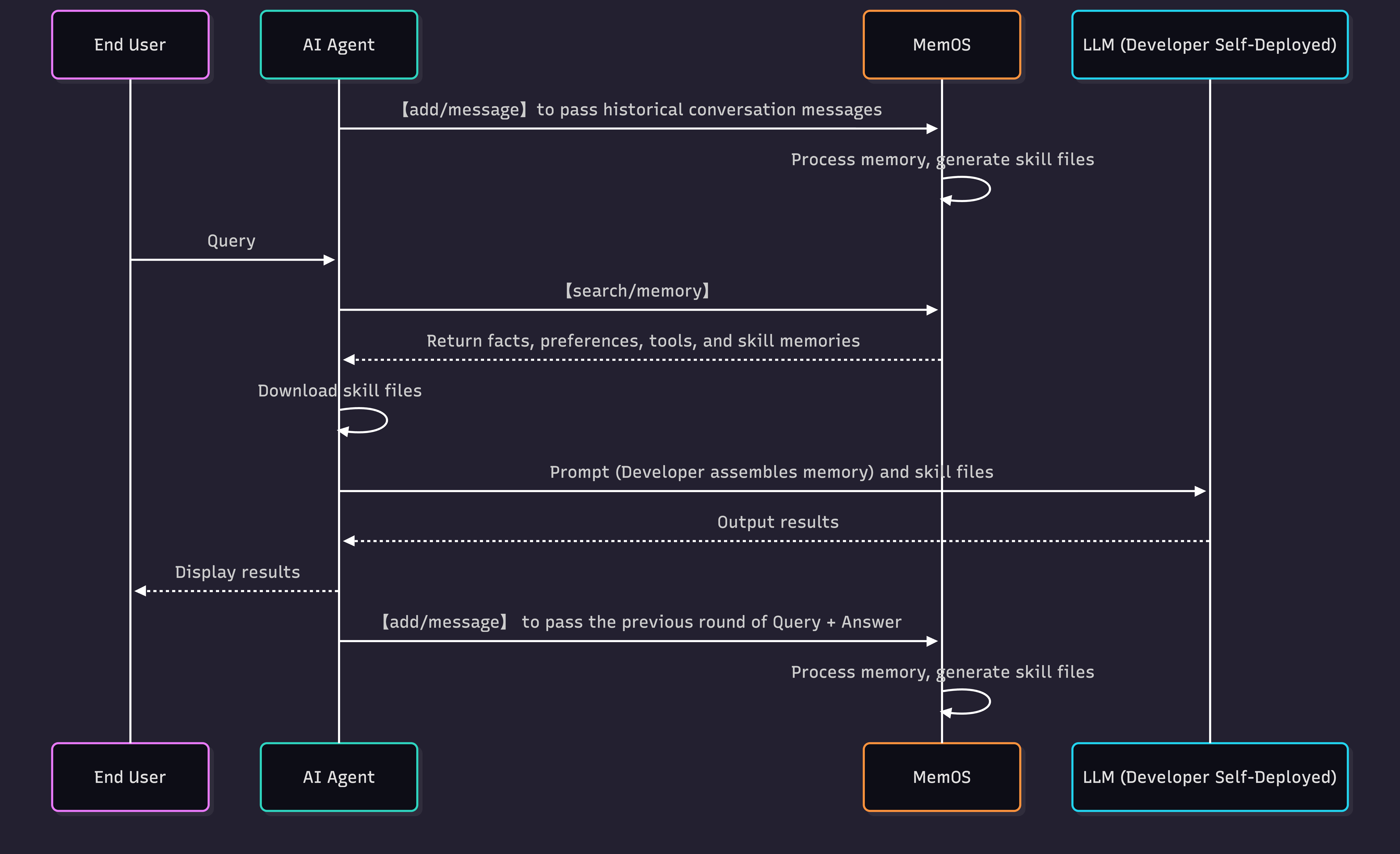
The diagram above shows the full interaction flow between end users, the AI Agent you build, and MemOS:
- Call the
add/messageAPI to send the user's conversation messages to MemOS. - After receiving the request, MemOS processes the messages in sequence and generates Skill files:
a. Intelligent chunking: identify task boundaries in historical conversations and split them into task text chunks.
b. Cluster extraction: cluster similar task text chunks and combine them with the user's historical memories to extract structured skill text.
c. Skill conversion: convert the skill into a runnable and recognizable Skill file. - Call the
search/memoryAPI to retrieve memories. MemOS returns user facts, preferences, tool memories, and matching Skill files related to the current context in a unified response. - Download the Skill file and pass both memories and the Skill file to your self-hosted LLM, enabling effective use of long-term experience and automatically generated skills.
The entire process does not require manually uploading any skill files.
Travel Planning Example
Using "Travel Planning" as an example to show how the same task generates different skills for different users.
1. Add Conversations
The user expresses travel planning preferences in conversation: no backtracking, compact routes, cultural attractions, and weather checks in advance.
import os
import json
import requests

os.environ["MEMOS_API_KEY"] = "YOUR_API_KEY"
os.environ["MEMOS_BASE_URL"] = "https://memos.memtensor.cn/api/openmem/v1"

data = {
    "user_id": "memos_user_j",
    "conversation_id": "travel_0127",
    "messages": [
        {
            "role": "user",
            "content": "I'm going to Chengdu next week for 5 days. I like intense, no-backtracking trips. Also mark the must-try food along the route."
        },
        {"role": "assistant", "content": "...omitted..."},
        {
            "role": "user",
            "content": "I prefer cultural attractions. Not interested in shopping malls."
        },
        {"role": "assistant", "content": "...omitted..."},
        {
            "role": "user",
            "content": "Check the weather and temperature in advance so I can pack properly."
        },
        {"role": "assistant", "content": "...omitted..."}
    ]
}

headers = {
    "Content-Type": "application/json",
    "Authorization": f"Token {os.environ['MEMOS_API_KEY']}"
}
url = f"{os.environ['MEMOS_BASE_URL']}/add/message"

res = requests.post(url=url, headers=headers, data=json.dumps(data))
print(f"result: {res.json()}")
2. Retrieve Skills
When the same user makes a similar request next time, pass include_skill=true:
data = {
    "query": "I'm planning a 7-day trip to Yunnan for the spring holiday.",
    "user_id": "memos_user_j",
    "conversation_id": "travel_0301",
    "include_skill": True
}

res = requests.post(
    url=f"{os.environ['MEMOS_BASE_URL']}/search/memory",
    headers=headers,
    data=json.dumps(data)
)
print(f"result: {res.json()}")
3. Generated Skill Example
For the same "Travel Planning" task, MemOS does not apply one template to every user. It turns each user's long-term conversational preferences into a dedicated, reusable capability. As shown below, MemOS may generate a skill like this for the high-energy planner:
---
name: Travel Itinerary Planning
description: Design multi-day itineraries for high-energy travelers, including efficient routes, cultural attractions, food spots, and weather-adapted suggestions.
---

## Procedure
1. Determine trip duration, destination, and user preferences
2. Collect cultural attractions, food spots, and transit info
3. Plan daily routes by area to avoid backtracking
4. Weave food spots into the transit route
5. Check weather forecast and adjust routes and packing advice

## Experience
- Prioritize cultural attractions over shopping
- Keep routes compact for high-energy travel
- Plan each day geographically to move forward

## User Preferences
- No backtracking
- Prefers cultural attractions
- Wants weather checked in advance
If another user is a "low-energy relaxed traveler" who mentions being a night owl, hating early mornings, not wanting long commutes, and preferring hidden gems, MemOS generates a noticeably different skill:
---
name: Travel Itinerary Planning
description: Help low-energy travelers plan relaxed, flexible itineraries focused on afternoon and evening experiences.
---

## Procedure
1. Confirm user's energy level, wake-up time, and max commute tolerance
2. Prioritize nearby, easy-access spots that don't require early starts
3. Focus activities on afternoon, evening, and nighttime
4. Include hidden gems, avoid overly popular crowded routes
5. Keep flexible time slots for spontaneous changes

## Experience
- Avoid scheduling early-morning activities
- Avoid long commutes and packed schedules
- Recommend places reachable by subway or short taxi rides

## User Preferences
- Night owl, can't wake up early
- Dislikes long commutes
- Likes niche, less conventional experiences
Upload Custom Skills
Customer Return Example
When you already have a clear standard workflow, upload the skill file directly to a knowledge base. MemOS will retrieve and return relevant skills in a unified way. The following example uses "Customer Service Agent Return Processing" to walk through the full flow from skill upload to retrieval.
1. Upload to the Knowledge Base via API
Upload a skill file that guides a customer service Agent to help users complete product returns.
import os
import json
import requests

os.environ["MEMOS_API_KEY"] = "YOUR_API_KEY"
os.environ["MEMOS_BASE_URL"] = "https://memos.memtensor.cn/api/openmem/v1"

headers = {
    "Content-Type": "application/json",
    "Authorization": f"Token {os.environ['MEMOS_API_KEY']}"
}

data = {
    "knowledgebase_id": "kb_xxx",  # Replace with your knowledge base ID
    "file": [
        {
            "type": "skill",
            "content": "https://cdn.memtensor.com.cn/file/SKILL.md"  # Replace with your public file URL
        }
    ]
}

url = f"{os.environ['MEMOS_BASE_URL']}/add/knowledgebase-file"

res = requests.post(url=url, headers=headers, data=json.dumps(data))
print(f"result: {res.json()}")
import os
import json
import base64
import requests

os.environ["MEMOS_API_KEY"] = "YOUR_API_KEY"
os.environ["MEMOS_BASE_URL"] = "https://memos.memtensor.cn/api/openmem/v1"

skill_markdown = """---
name: Customer Return Processing
description: Guide customer service to handle user return requests following standard procedures
---

## Procedure

1. Verify user identity and order number
2. Confirm return reason meets policy requirements
3. Guide user to select return method (pickup / self-ship)
4. Generate return tracking number and notify user
5. Track logistics status and notify user upon refund completion

## Experience

- No-reason returns accepted within 7 days of receipt
- Fresh products do not support returns; use after-sales compensation
- High-value items (>$70) require supervisor approval

## User Preferences

- Recommend pickup service first to reduce user effort
- Default refund to original payment method

## Examples

### Example 1: Standard product return
User: I want to return the headphones I bought three days ago.
Assistant: Got it. I've confirmed your order is within the 7-day no-reason return window. Would you prefer pickup or self-shipping?
"""

encoded_skill = base64.b64encode(skill_markdown.encode("utf-8")).decode("utf-8")

data = {
    "knowledgebase_id": "kb_xxx",  # Replace with your knowledge base ID
    "file": [
        {
            "type": "skill",
            "name": "customer-return-sop.md",
            "content": f"data:text/markdown;base64,{encoded_skill}"
        }
    ]
}

headers = {
    "Content-Type": "application/json",
    "Authorization": f"Token {os.environ['MEMOS_API_KEY']}"
}
url = f"{os.environ['MEMOS_BASE_URL']}/add/knowledgebase-file"

res = requests.post(url=url, headers=headers, data=json.dumps(data))
print(f"result: {res.json()}")
2. Upload Skill Files via Dashboard
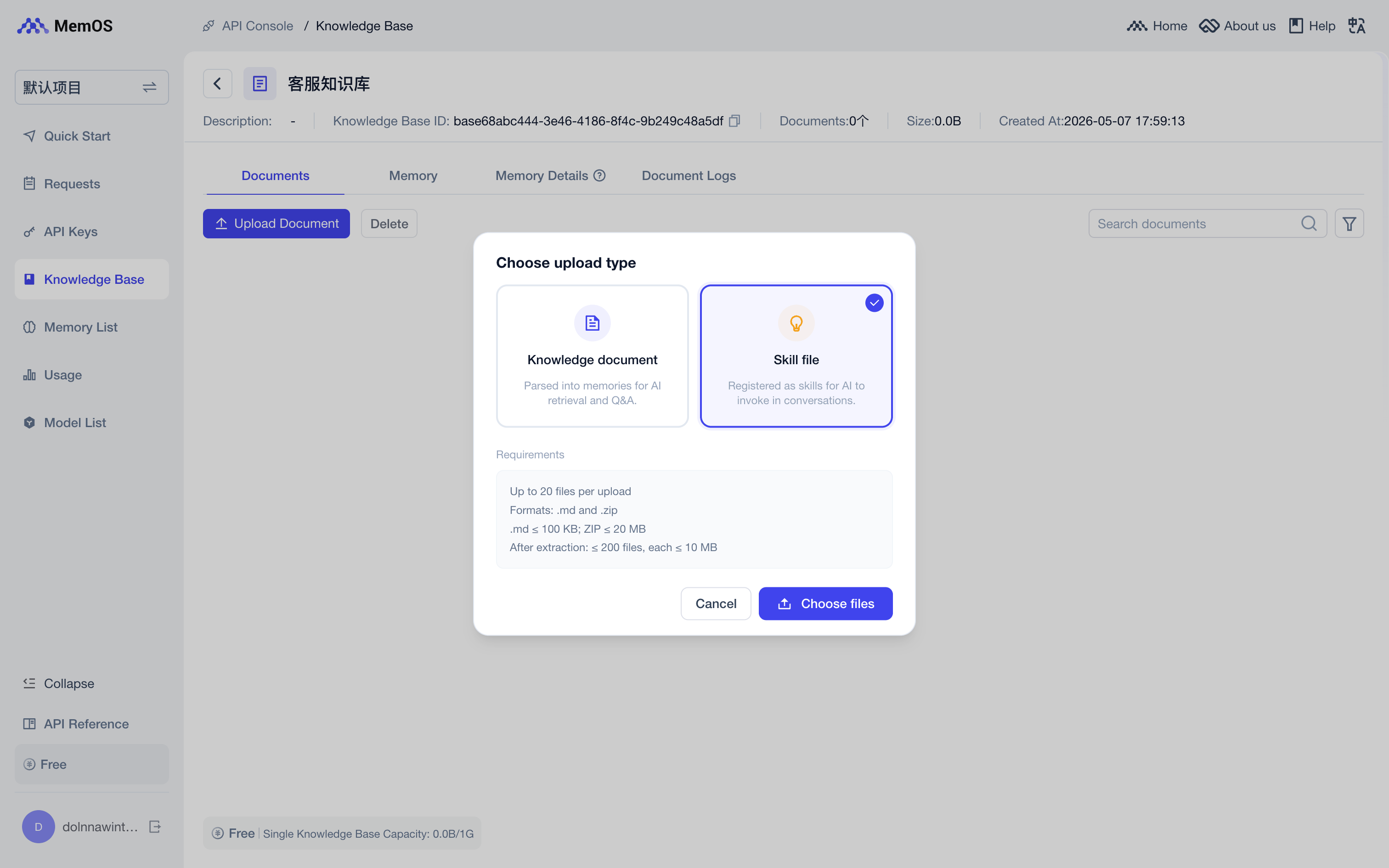
Go to Dashboard - Knowledge Base, select the target knowledge base, click "Upload Document", and drag in your .md or .zip file. Select "Skill file" as the upload type.
3. Retrieve Skills
After upload succeeds, pass knowledgebase_ids and enable include_skill during retrieval. MemOS will return skills relevant to the query. As shown below, the Agent can follow the "Customer Return Processing" flow to guide the user through the return.
data = {
    "query": "The user wants to return headphones bought three days ago",
    "user_id": "memos_user_123",
    "conversation_id": "session_001",
    "knowledgebase_ids": ["kb_xxx"],
    "include_skill": True
}

res = requests.post(
    url=f"{os.environ['MEMOS_BASE_URL']}/search/memory",
    headers=headers,
    data=json.dumps(data)
)
print(f"result: {res.json()}")
Skill File Specification
1. .md Single File
- The constraints are as follows:
- Size limit: ≤ 100KB
- File content: must include
nameanddescription
- Recommended body structure:
---
name: (Skill name)
description: (One-sentence description of purpose and scenario)
---

## Procedure
1. Step one
2. Step two
3. Step three

## Experience
- Experience or note one
- Experience or note two

## User Preferences
- Preference setting one
- Preference setting two

## Examples

### Example 1: (Scenario description)
(Complete input/output example)

## Additional Information
(Additional notes, such as reference links or special rules)
2. .zip Skill Package
- The constraints are as follows:
| Constraint | Requirement |
|---|---|
| Format | Standard ZIP, no rar/7z |
| Zip size | ≤ 20MB |
| File count after extraction | ≤ 200 |
| Single file after extraction | ≤ 10MB |
| SKILL.md | ≤ 100KB, name/description required; must be at the first level of the archive |
- Recommended structure:
refund-sop-v1.zip
├── SKILL.md
├── references/
│   └── return_policy_summary.md
├── scripts/
│   └── check_order.py
└── assets/
    └── flowchart.png
How to Use Retrieved Skills
Returned Skill Details
Regardless of whether the skill is auto-generated or uploaded to a knowledge base, each skill in skill_detail_list contains two fields:
| Field | Description |
|---|---|
skill_value | Structured skill content; can be converted to a string and injected into the Agent's prompt |
skill_url | Download link for the skill file; for ZIP packages, the Agent can download scripts, references, and other attachments |
Usage Reference
Choose the usage method based on whether your Agent can use Skill files.
1. The Agent Supports Skill Files
Provide skill_url to the Agent so it can download the file. You can write it into the prompt:
skill_detail = result["skill_detail_list"][0]
skill_url = skill_detail.get("skill_url")

system_prompt = f"""You are a customer service assistant. Use the following Skill file when handling the task:

{skill_url}
"""
2. The Agent Does Not Support Skill Files
Convert skill_value to a string and add it to the prompt:
skill_detail = result["skill_detail_list"][0]
skill = str(skill_detail["skill_value"])

system_prompt = f"""You are a customer service assistant. Refer to this skill when handling the task:

{skill}
"""
Start exploring MemOS Skills now!
- Go to the Dashboard - Skills page to view auto-generated skills.
- Don't have any skills yet? Add messages to trigger generation.
- Want to upload custom skills? Go to Dashboard - Knowledge Base to upload.