Knowledge Base
1. MemOS Knowledge Base vs Traditional RAG
MemOS Knowledge Base supports developers in integrating business knowledge into the long-term memory system of intelligent applications.
The system uses uploaded documents as the underlying data source to build and maintain an independent memory layer, supporting natural language interaction applications such as Q&A. As end-users continue to use it, MemOS dynamically evolves and updates memories based on conversation content, thereby promoting automatic iteration and self-evolution of the knowledge base.
Unlike the static storage of traditional RAG, MemOS makes the knowledge base part of "memory". AI applications with "memory" can not only query information more accurately but also better understand the background and the user. Let's look at two real scenarios to compare the two solutions:
Shopping Customer Service Robot
Background
DAY 1 User asks: I have a three-month-old Golden Retriever. Which dog food is better? By the way, it doesn't eat chicken flavor.
DAY 1 User bought A lamb puppy food under the assistant's recommendation.
DAY 10 User asks: The dog has diarrhea eating this dog food. I want to change to another one.
RAG Solution
# Retrieve snippets related to "puppy food recommendation" and "diarrhea" based on user input, but fail to recall "user's dog doesn't eat chicken flavor". Retrieved knowledge:

1. Common reasons for dog food diarrhea: Can switch to hypoallergenic dog food.
2. Hypoallergenic puppy food recommendation: B (Chicken), C (Salmon).

# 🤦 Shopping Assistant: If diarrhea occurs now, you can try B (Chicken flavor), C (Salmon).
MemOS Solution
# Retrieve relevant memories based on user input, perceive that the user's dog is a three-month-old Golden Retriever puppy, dislikes chicken, and needs a recommendation for puppy food that won't cause diarrhea. Retrieved memories:

1. The user has a three-month-old Golden Retriever weighing about 12 catties.
2. The user's dog does not eat chicken-flavored dog food.
3. The user previously purchased lamb puppy food.
4. Common reasons for dog food diarrhea: Can switch to hypoallergenic dog food.
5. Hypoallergenic puppy food recommendation: B (Chicken), C (Salmon).

# ✅ Shopping Assistant: You mentioned before that the dog is a 3-month-old Golden Retriever and cannot eat chicken flavor, so I have excluded all chicken-flavored puppy foods for you. You bought lamb + salmon puppy food before. If diarrhea occurs now, you can try the milder C (Salmon Puppy Hypoallergenic).
Enterprise Knowledge Base Assistant
Background
DAY 1 Employee asks: My computer is a MacBook Pro 13-inch, Intel chip. How do I install the company intranet proxy?
DAY 1 Assistant provided the installation steps for the Intel version.
DAY 20 Employee asks: The intranet proxy won't open. Which version should I reinstall?
RAG Solution
# Retrieve content related to "intranet proxy" and "won't open" based on user input, but fail to recall "user's device model". Retrieved knowledge:

1. Intranet proxy common troubleshooting
2. Intranet proxy installation instructions for M1/M2 (ARM) versions
3. Windows intranet proxy client installation instructions
4. Network connection and certificate issues
5. General FAQ

# 🤦 Knowledge Base Assistant: Please try to re-download and install the latest Mac M1/M2 (ARM) version or Windows intranet proxy client. Here are the installation steps: ...
MemOS Solution
# Retrieve memories related to "intranet proxy" and "won't open" based on the employee's question, automatically identify the employee's device model. Retrieved memories:

1. The user installed the company intranet proxy 20 days ago, and his device is MacBook Pro 13 (Intel).
2. Intranet proxy common troubleshooting
3. Intranet proxy installation instructions for Intel version

# ✅ Knowledge Base Assistant: You are using a MacBook Pro with an Intel chip. It is recommended to reinstall the Intel version of the intranet proxy client. Here are the download link and installation steps for the Intel version: ...
RAG is good at retrieving information semantically similar to the query from the knowledge base, but it is stateless: every query is independent, lacking understanding of the specific user and context.
MemOS can understand information such as relationships, time, and preferences, linking current questions with historical memories, and finding and using knowledge with "context":
- Understand Users: MemOS knows "who you are" and "what you are doing". Just ask a question, and MemOS will automatically complete the context.
- Personalization: For different positions and work habits, MemOS can remember "this client dislikes overly aggressive sales", "you use Python more often than Java", "you consulted the reimbursement policy last time, do you need to enter the application process this time".
- Knowledge Evolution: When there are "rules of thumb" not written in documents in the actual process, MemOS will precipitate them into new memories, continuously supplementing and perfecting the knowledge system.
2. How it Works
- Upload: Create a knowledge base and upload documents via the console or API.
- Validation: Complete authentication and verify compliance of document format, size, etc.
- Storage: After successful upload, documents are saved by MemOS and enter the processing queue.
- Parsing: Parse original document content according to different file types.
- Intelligent Segmentation: Split documents into finer-grained content fragments based on title, structure, and semantics.
- Generate Memory: MemOS generates knowledge memories based on fragments, forming a complete project memory bank together with user long-term memories.
- Embedding and Indexing: Write all memory content into the database and establish embedding indexes to support millisecond-level retrieval.
3. Knowledge Base Requirements
Capacity Limits
MemOS Cloud Service currently offers multiple pricing plans from free to enterprise versions for all developers. Different versions have different limits on knowledge base capacity and quantity.
| Version | Knowledge Base Storage Limit |
|---|---|
| Free | Knowledge Base Count: 10; Single KB Storage: 1G |
| Starter | Knowledge Base Count: 30; Single KB Storage: 10G |
| Pro | Knowledge Base Count: 100; Single KB Storage: 100G |
When your service level is downgraded, if the existing knowledge base exceeds the capacity limit of the current version, MemOS will not clear existing knowledge base data, but will restrict the following operations:
- Cannot create new knowledge bases
- Cannot continue to upload new documents
Document Limits
- Supported document types: PDF, DOCX, DOC, TXT, JSON, MD, XML
- Single file size limit: Not exceeding 100 MB, 500 pages
- Single upload file quantity limit: Not exceeding 20
When the number of files, single file size, or number of pages in a single upload exceeds the above limits, the upload task will be judged as processing failed.
Please adjust the files according to the requirements and re-initiate the upload request.
Skill Document Limits
In addition to regular knowledge documents, a knowledge base also supports uploading custom Skill documents. Skill documents are used to capture reusable task-handling workflows and can be returned to the Agent together with other memories during retrieval. The format requirements are as follows:
- Single
.mdfile
- Size limit: ≤ 100KB
- File content: must include
nameanddescription
- Skill package
.zip
| Constraint | Requirement |
|---|---|
| Format | Standard ZIP, no rar/7z |
| Zip size | ≤ 20MB |
| File count after extraction | ≤ 200 |
| Single file after extraction | ≤ 10MB |
| SKILL.md | ≤ 100KB, name/description required, must be at the first level of the archive |
4. Usage Example
Here is a complete knowledge base usage example to help you quickly get started with building your exclusive "Knowledge Base Assistant".
Create Knowledge Base: Financial Reimbursement Knowledge Base
import os
import requests
import json

# Replace with your MemOS API Key
os.environ["MEMOS_API_KEY"] = "YOUR_API_KEY"
os.environ["MEMOS_BASE_URL"] = "https://memos.memtensor.cn/api/openmem/v1"

data = {
    "knowledgebase_name": "Financial Reimbursement Knowledge Base",
    "knowledgebase_description": "Summary of all financial reimbursement related knowledge of the company"
  }
headers = {
  "Content-Type": "application/json",
  "Authorization": f"Token {os.environ['MEMOS_API_KEY']}"
}
url = f"{os.environ['MEMOS_BASE_URL']}/create/knowledgebase"

res = requests.post(url=url, headers=headers, data=json.dumps(data))

print(f"result: {res.json()}")
"result": {
  "code": 0,
  "data": {
    "id": "idxxxxx"   #Replace with the Knowledge Base ID created above
  },
  "message": "ok"
}
Upload Document: Software Procurement Reimbursement Policy
import os
import requests
import json

# Replace with your MemOS API Key
os.environ["MEMOS_API_KEY"] = "YOUR_API_KEY"
os.environ["MEMOS_BASE_URL"] = "https://memos.memtensor.cn/api/openmem/v1"

data = {
    "knowledgebase_id": "idxxxxx",    #Replace with the Knowledge Base ID created above
    "file": [
        {"content": "https://cdn.memtensor.com.cn/file/Software_Procurement_Reimbursement_Policy.pdf"}
    ]
}

headers = {
  "Content-Type": "application/json",
  "Authorization": f"Token {os.environ['MEMOS_API_KEY']}"
}
url = f"{os.environ['MEMOS_BASE_URL']}/add/knowledgebase-file"

res = requests.post(url=url, headers=headers, data=json.dumps(data))

print(f"result: {res.json()}")
"result": {
  "code": 0,
  "data": [
    {
      "id": "1f35642253606ed1e9dd8cd8113a8998",
      "name": "Software_Procurement_Reimbursement_Policy.pdf",
      "sizeMB": 0.06331157684326172,
      "status": "running"
    }
  ],
  "message": "ok"
}
Add User Conversation
import os
import requests
import json

# Replace with your MemOS API Key
os.environ["MEMOS_API_KEY"] = "YOUR_API_KEY"
os.environ["MEMOS_BASE_URL"] = "https://memos.memtensor.cn/api/openmem/v1"

data = {
    "user_id": "memos_user_123",
    "conversation_id": "0610",
    "messages": [
    {
        "role": "user",
        "content": "I am a designer in the Creative Platform Department."
    },
    {
        "role": "assistant",
        "content": "Okay, I've noted that."
    }
    ]
}

headers = {
  "Content-Type": "application/json",
  "Authorization": f"Token {os.environ['MEMOS_API_KEY']}"
}
url = f"{os.environ['MEMOS_BASE_URL']}/add/message"

res = requests.post(url=url, headers=headers, data=json.dumps(data))

print(f"result: {res.json()}")
Retrieve Knowledge Base Memory
import os
import requests
import json

# Replace with your MemOS API Key
os.environ["MEMOS_API_KEY"] = "YOUR_API_KEY"
os.environ["MEMOS_BASE_URL"] = "https://memos.memtensor.cn/api/openmem/v1"

data = {
    "user_id": "memos_user_123",
    "conversation_id": "1211",
    "query": "Check the software procurement reimbursement limit for me.",
    "knowledgebase_ids":["idxxxxx"]    #Replace with the Knowledge Base ID created above
}
headers = {
  "Content-Type": "application/json",
  "Authorization": f"Token {os.environ['MEMOS_API_KEY']}"
}
url = f"{os.environ['MEMOS_BASE_URL']}/search/memory"

res = requests.post(url=url, headers=headers, data=json.dumps(data))


# Prettify JSON output
json_res = res.json()
print(json.dumps(json_res, indent=2, ensure_ascii=False))
"memory_detail_list": [
  {
    "id": "2c760355-de4b-4a8f-b98d-b92851d23fa7",
    "memory_key": "Software Procurement Reimbursement Policy (Trial Version)",
    "memory_value": "This policy aims to standardize the procurement and reimbursement process for various software in the company, requiring all software procurement to follow the procurement amount limits for specific categories. The procurement limit for design software is 1000 yuan, applicable to graphic design, video editing, and prototype design, with examples including Photoshop and Premiere. The procurement limit for code/development software is 1500 yuan, applicable to IDEs and development frameworks, with examples like PyCharm and Visual Studio. The procurement limit for office software is 800 yuan, applicable to document editing and spreadsheet processing, with examples including Office Suite and WPS. The procurement limit for data analysis software is 1200 yuan, applicable to data statistics and visualization, with examples including Tableau and Power BI. The procurement limit for security and protection software is 1000 yuan, applicable to antivirus and firewalls. The procurement limit for collaboration/project management software is 900 yuan, with examples including Jira and Slack. The procurement limit for special industry software is 2000 yuan, requiring special approval. All procurement must comply with company budget and information security requirements; software exceeding the limit requires a business explanation and special approval.",
    "memory_type": "WorkingMemory",
    "create_time": 1765525947718,
    "conversation_id": "default_session",
    "status": "activated",
    "confidence": 0.99,
    "tags": [
      "Software Procurement",
      "Reimbursement Policy",
      "Approval Process",
      "Budget",
      "Information Security",
      "mode:fine",
      "multimodal:file"
    ],
    "update_time": 1765525947720,
    "relativity": 0.89308184
  },
  {
    "id": "81fd1e79-65be-4d4e-81e0-8f76ba697c55",
    "memory_key": "Position Information",
    "memory_value": "User is a designer in the Creative Platform Department.",
    "memory_type": "WorkingMemory",
    "create_time": 1765526247112,
    "conversation_id": "0610",
    "status": "activated",
    "confidence": 0.99,
    "tags": [
      "Position",
      "Department",
      "Design"
    ],
    "update_time": 1765526247113,
    "relativity": 1.6319022e-05
  }
]
Feedback to Optimize Knowledge Base
In enterprises, it is common for company policies/knowledge to be updated while the knowledge base is not updated in time. Currently, MemOS supports feedback on knowledge base memories through natural language conversation, used to quickly update knowledge base memories, thereby improving accuracy and timeliness.
Try it out, drive the knowledge base to always stay up-to-date with the simplest interaction method.
import os
import requests
import json

# Replace with your MemOS API Key
os.environ["MEMOS_API_KEY"] = "YOUR_API_KEY"
os.environ["MEMOS_BASE_URL"] = "https://memos.memtensor.cn/api/openmem/v1"

data = {
    "user_id": "memos_user_123",
    "conversation_id": "1212",
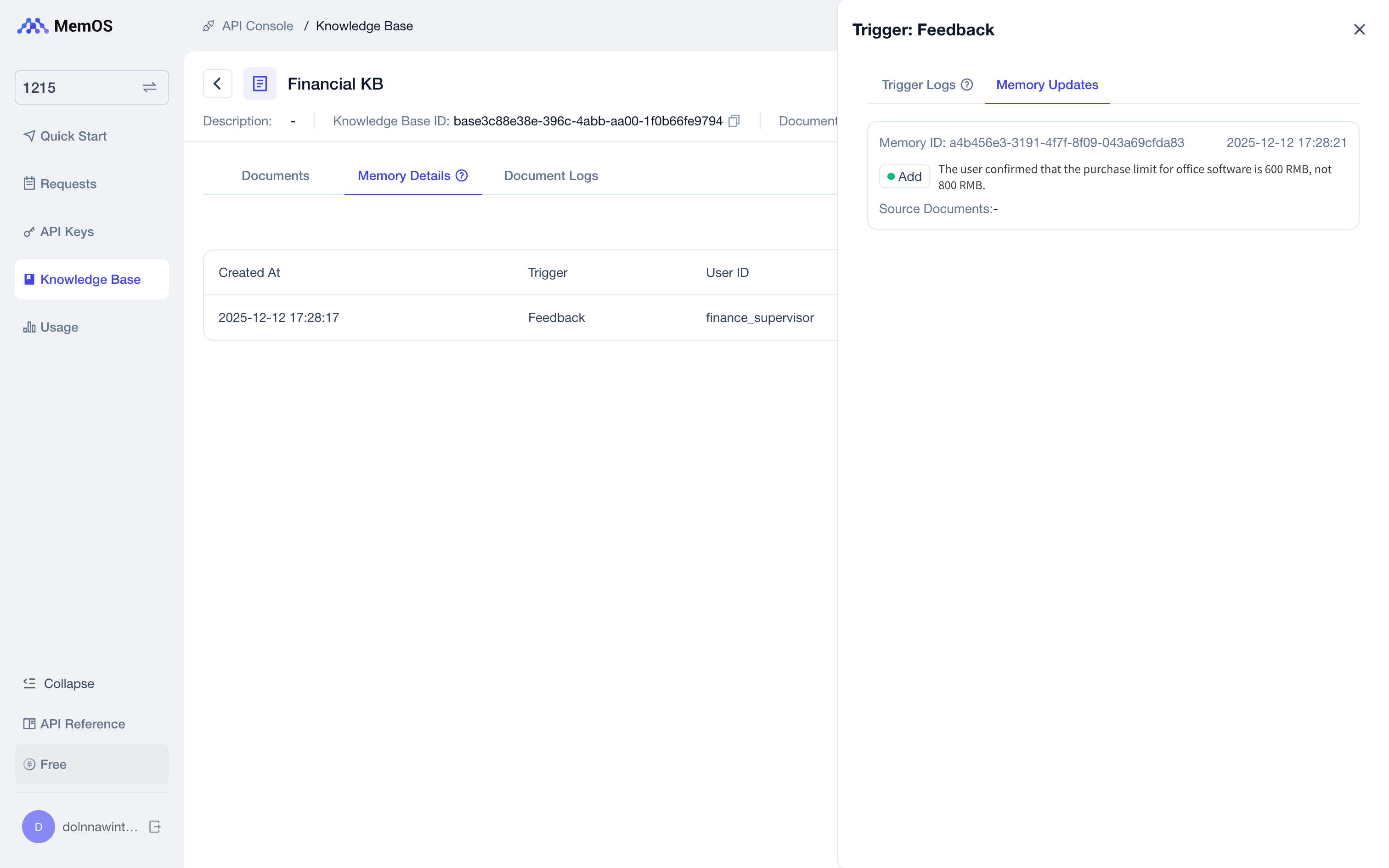
    "feedback_content": "The procurement limit for office software is 600 yuan, not 800 yuan.",
    "allow_knowledgebase_ids":["idxxxxx"]    #Replace with the Knowledge Base ID created above
}

headers = {
  "Content-Type": "application/json",
  "Authorization": f"Token {os.environ['MEMOS_API_KEY']}"
}
url = f"{os.environ['MEMOS_BASE_URL']}/add/feedback"

res = requests.post(url=url, headers=headers, data=json.dumps(data))

print(f"result: {res.json()}")
import os
import requests
import json

# Replace with your MemOS API Key
os.environ["MEMOS_API_KEY"] = "YOUR_API_KEY"
os.environ["MEMOS_BASE_URL"] = "https://memos.memtensor.cn/api/openmem/v1"

data = {
    "user_id": "memos_user_123",
    "conversation_id": "1211",
    "query": "Check the software procurement reimbursement limit for me.",
    "knowledgebase_ids":["idxxxxx"]    #Replace with the Knowledge Base ID created above
}
headers = {
  "Content-Type": "application/json",
  "Authorization": f"Token {os.environ['MEMOS_API_KEY']}"
}
url = f"{os.environ['MEMOS_BASE_URL']}/search/memory"

res = requests.post(url=url, headers=headers, data=json.dumps(data))


# Prettify JSON output
json_res = res.json()
print(json.dumps(json_res, indent=2, ensure_ascii=False))
The output result is as follows (Simplified):
"memory_detail_list": [
  {
    "id": "8a4f3d2e-c417-4e53-bc25-54451abd5ac8",
    "memory_key": "Software Procurement Reimbursement Policy (Trial Version)",
    "memory_value": "This policy aims to standardize the procurement and reimbursement process for various software in the company, requiring all software procurement to follow the procurement amount limits for specific categories. The procurement limit for design software is 1000 yuan, applicable to graphic design, video editing, and prototype design, with examples including Photoshop and Premiere. The procurement limit for code/development software is 1500 yuan, applicable to IDEs and development frameworks, with examples like PyCharm and Visual Studio. The procurement limit for office software is 800 yuan, applicable to document editing and spreadsheet processing, with examples including Office Suite and WPS. The procurement limit for data analysis software is 1200 yuan, applicable to data statistics and visualization, with examples including Tableau and Power BI. The procurement limit for security and protection software is 1000 yuan, applicable to antivirus and firewalls. The procurement limit for collaboration/project management software is 900 yuan, with examples including Jira and Slack. The procurement limit for special industry software is 2000 yuan, requiring special approval. All procurement must comply with company budget and information security requirements; software exceeding the limit requires a business explanation and special approval.",
    "memory_type": "LongTermMemory",
    "create_time": 1765525947718,
    "conversation_id": "default_session",
    "status": "activated",
    "confidence": 0.99,
    "tags": [
      "Software Procurement",
      "Reimbursement Policy",
      "Approval Process",
      "Budget",
      "Information Security",
      "mode:fine",
      "multimodal:file"
    ],
    "update_time": 1765525947720,
    "relativity": 0.8931847
  },
  {
    "id": "a72a04d1-d7ba-4ebd-9410-0097bfa6c20d",
    "memory_key": "Office Software Procurement Limit",
    "memory_value": "User confirmed that the procurement limit for office software is 600 yuan, not 800 yuan.",
    "memory_type": "WorkingMemory",
    "create_time": 1765531700539,
    "conversation_id": "1212",
    "status": "activated",
    "confidence": 0.99,
    "tags": [
      "Procurement",
      "Office Software",
      "Budget"
    ],
    "update_time": 1765531700540,
    "relativity": 0.7196722
  }
]
The Console - Knowledge Base displays details of all corrections or completions of knowledge base memories through natural language interaction.
5. More: Upload Skill Documents
If you want the knowledge base to return not only knowledge content but also reusable task-handling workflows, you can upload Skill documents to the knowledge base. Unlike regular documents, Skill documents must be marked with type: "skill" when uploaded.
After upload succeeds, pass knowledgebase_ids and enable include_skill during retrieval to return both knowledge base memories and matching skills.
import os
import requests
import json

# Replace with your MemOS API Key
os.environ["MEMOS_API_KEY"] = "YOUR_API_KEY"
os.environ["MEMOS_BASE_URL"] = "https://memos.memtensor.cn/api/openmem/v1"

data = {
    "knowledgebase_id": "idxxxxx",  # Replace with your knowledge base ID
    "file": [
        {
            "type": "skill",
            "content": "https://cdn.memtensor.com.cn/file/SKILL.md"
        }
    ]
}

headers = {
  "Content-Type": "application/json",
  "Authorization": f"Token {os.environ['MEMOS_API_KEY']}"
}
url = f"{os.environ['MEMOS_BASE_URL']}/add/knowledgebase-file"

res = requests.post(url=url, headers=headers, data=json.dumps(data))

print(f"result: {res.json()}")