Edge–Cloud Collaboration: Building Long-Term Memory for Smart Devices
MemOS helps smart devices remember and understand users over time.
Earbuds travel with us, watches track daily activities, home speakers and robots become part of everyday life, and phones and computers support our work. As these devices accompany users over time, MemOS memory helps them build a lasting understanding of each person, supporting ongoing assistance and personalized services.
Turn everyday interactions into context for future services, so devices gradually get to know their users.
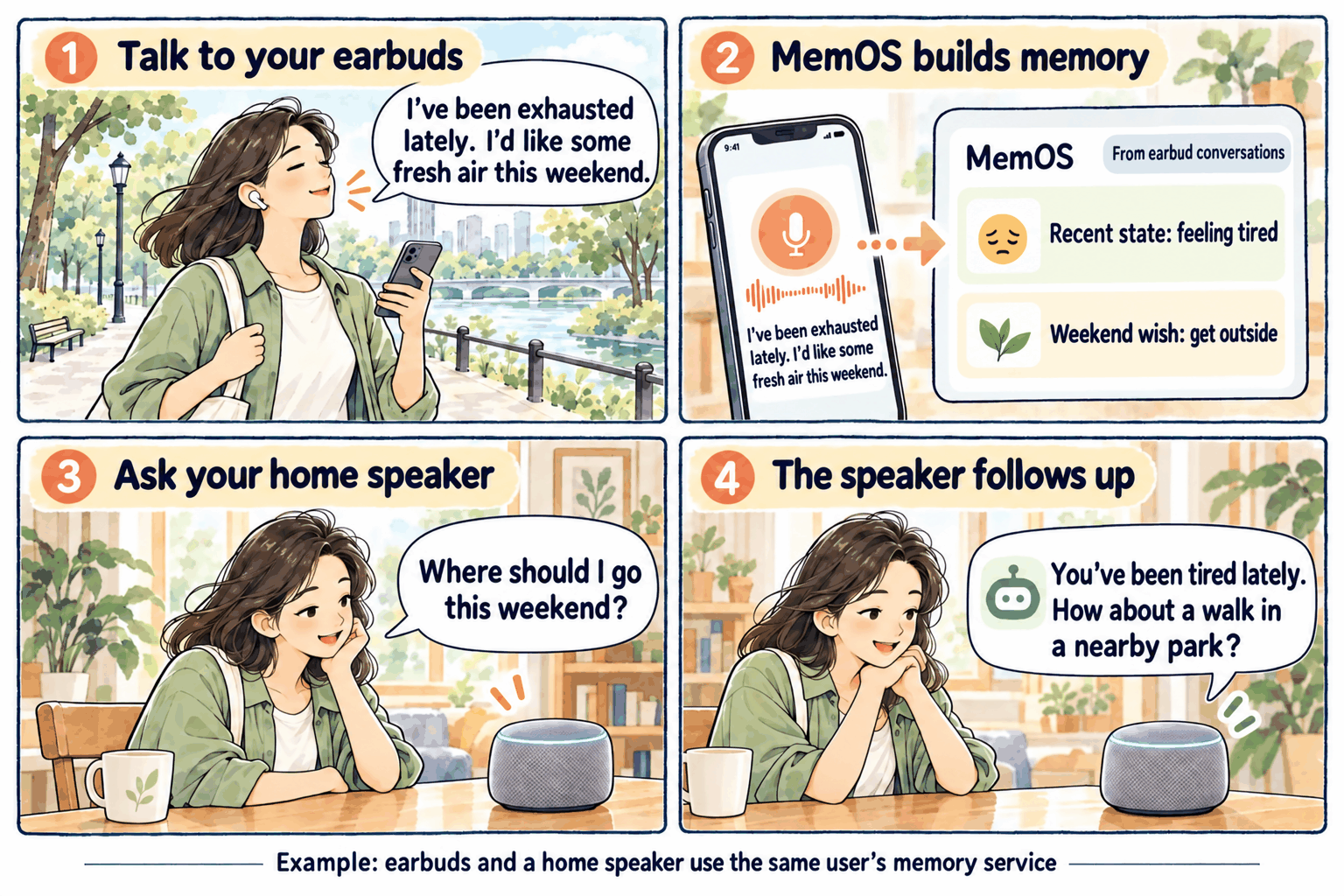
Build an understanding of users through everyday interactions
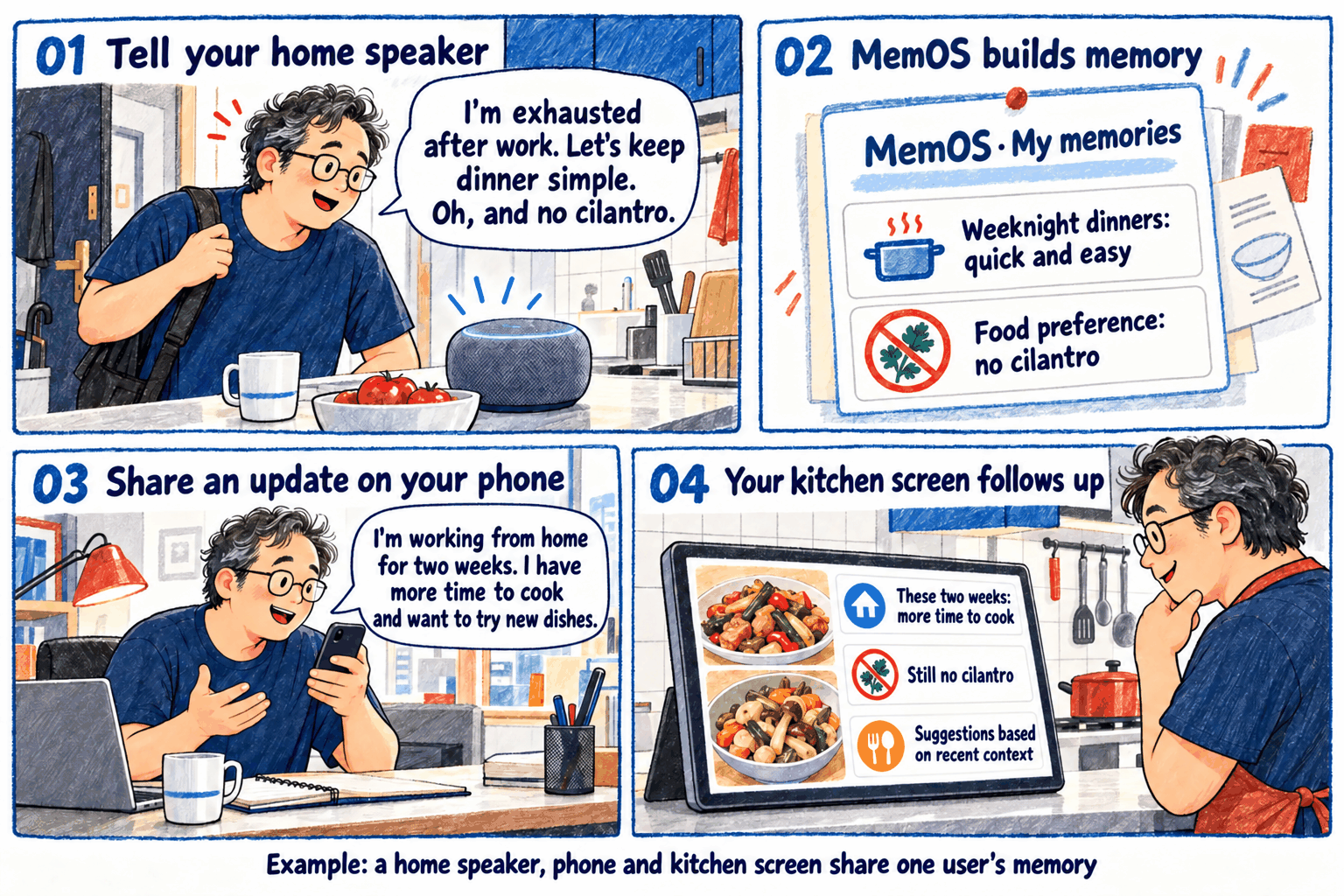
Continue the same activity across devices and over time
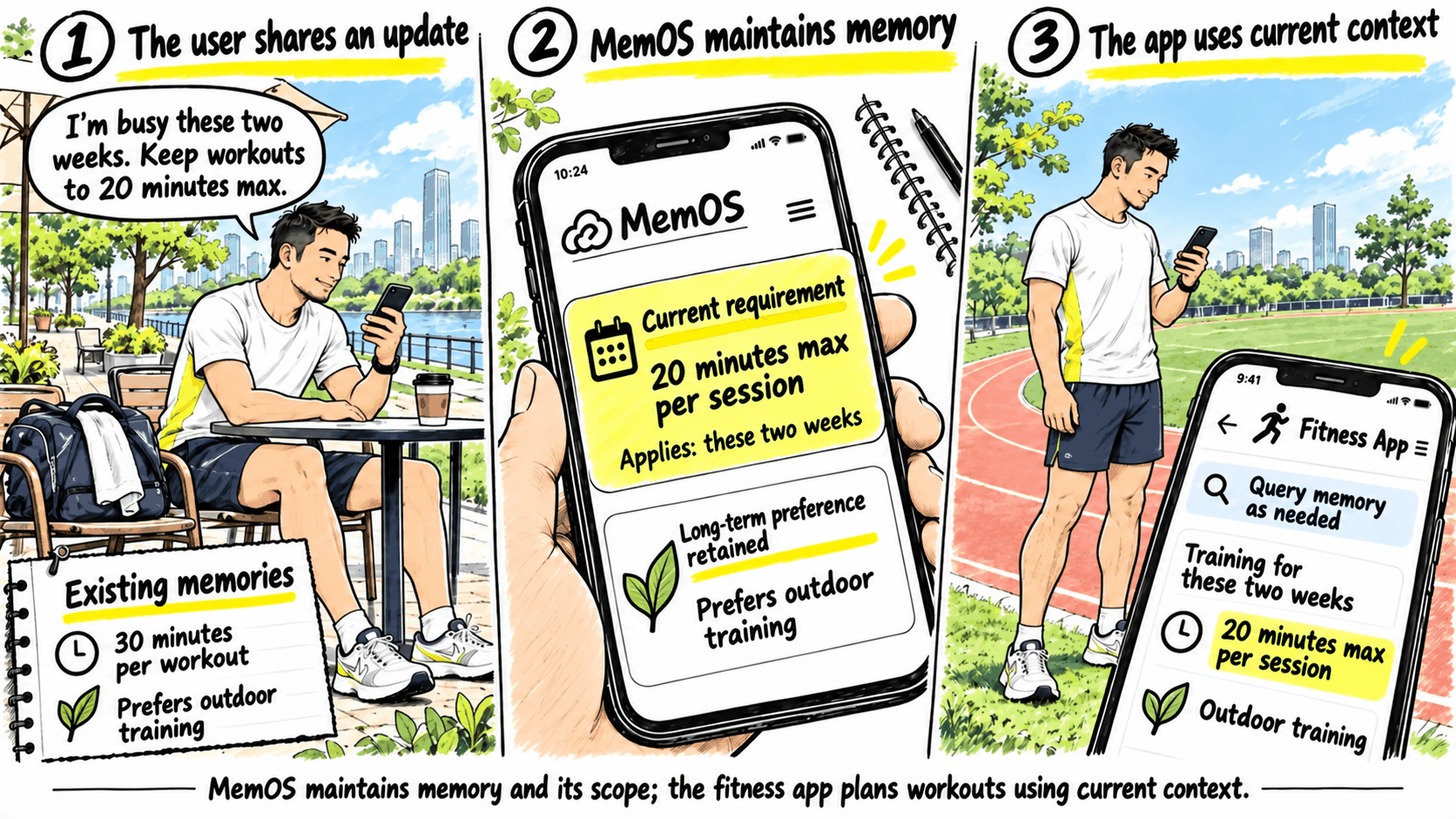
Keep the device's understanding up to date as users' needs change
The MemOS edge–cloud memory solution provides memory formation, organization, updates and retrieval for devices, companion apps, system features and agents.
The product supplies interaction and business data. MemOS determines what to remember, organizes it and maintains it as new information arrives. The product queries MemOS when it needs that context. These services can run on customer-managed servers, in the MemOS managed service, or on selected local nodes, with responsibilities distributed as needed. Customers choose where services run based on device resources, data-management requirements and model selection.
How MemOS provides memory services for devices
These experiences combine the device product, its backend and MemOS: the product supplies information, MemOS forms and maintains memory, and product features query and use it when needed.
Ingest interaction and business data
The product submits authorized information to MemOS together with identifiers such as the user, conversation, timestamp or existing business ID. When multiple devices connect, the product's existing account and device systems identify the current user and associate authorized requests with that same user. Speech transcription and exercise-event recognition are input processing; deciding what to remember and how to organize it is MemOS memory processing. The integration does not need to select valuable sentences, extract preferences or produce standardized memories first.
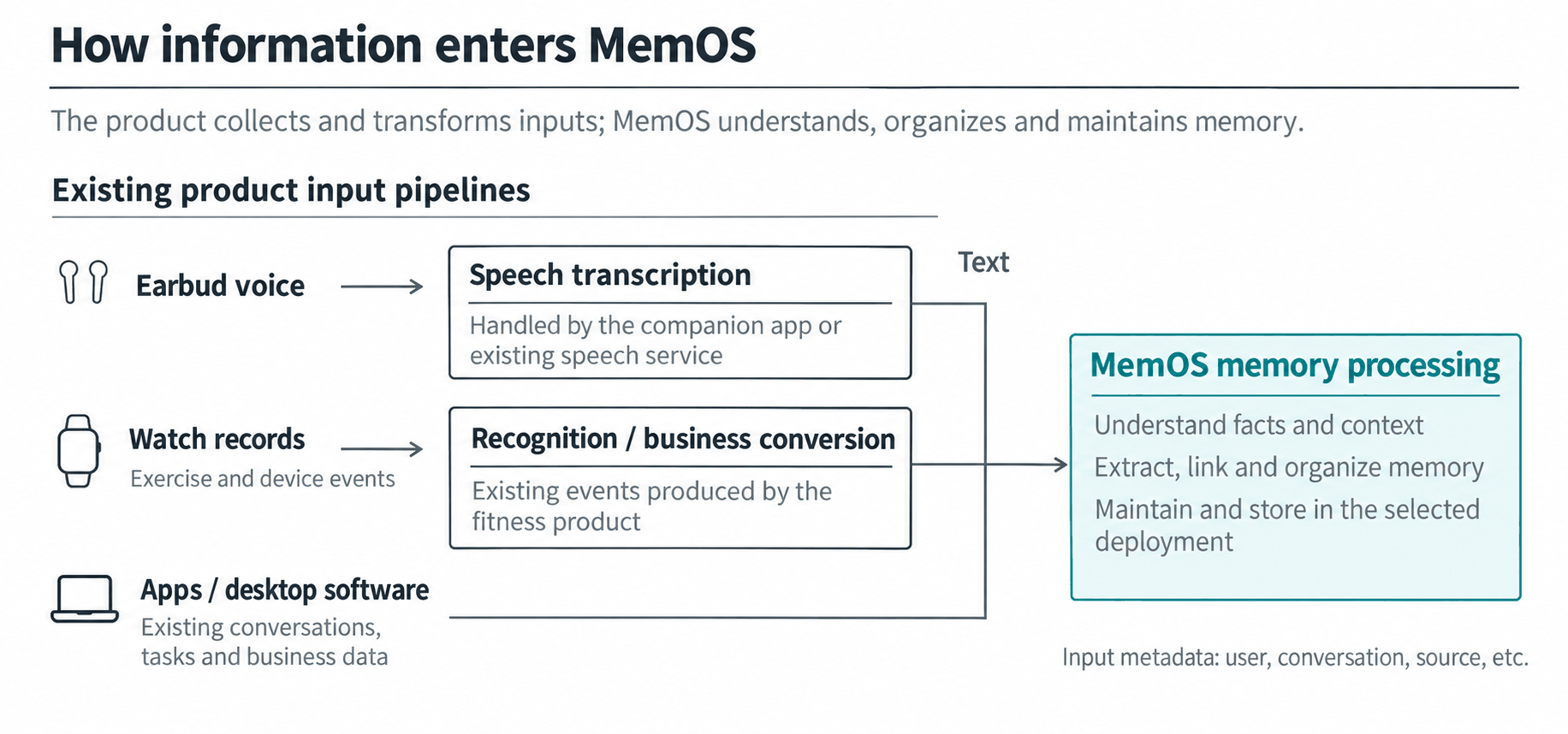
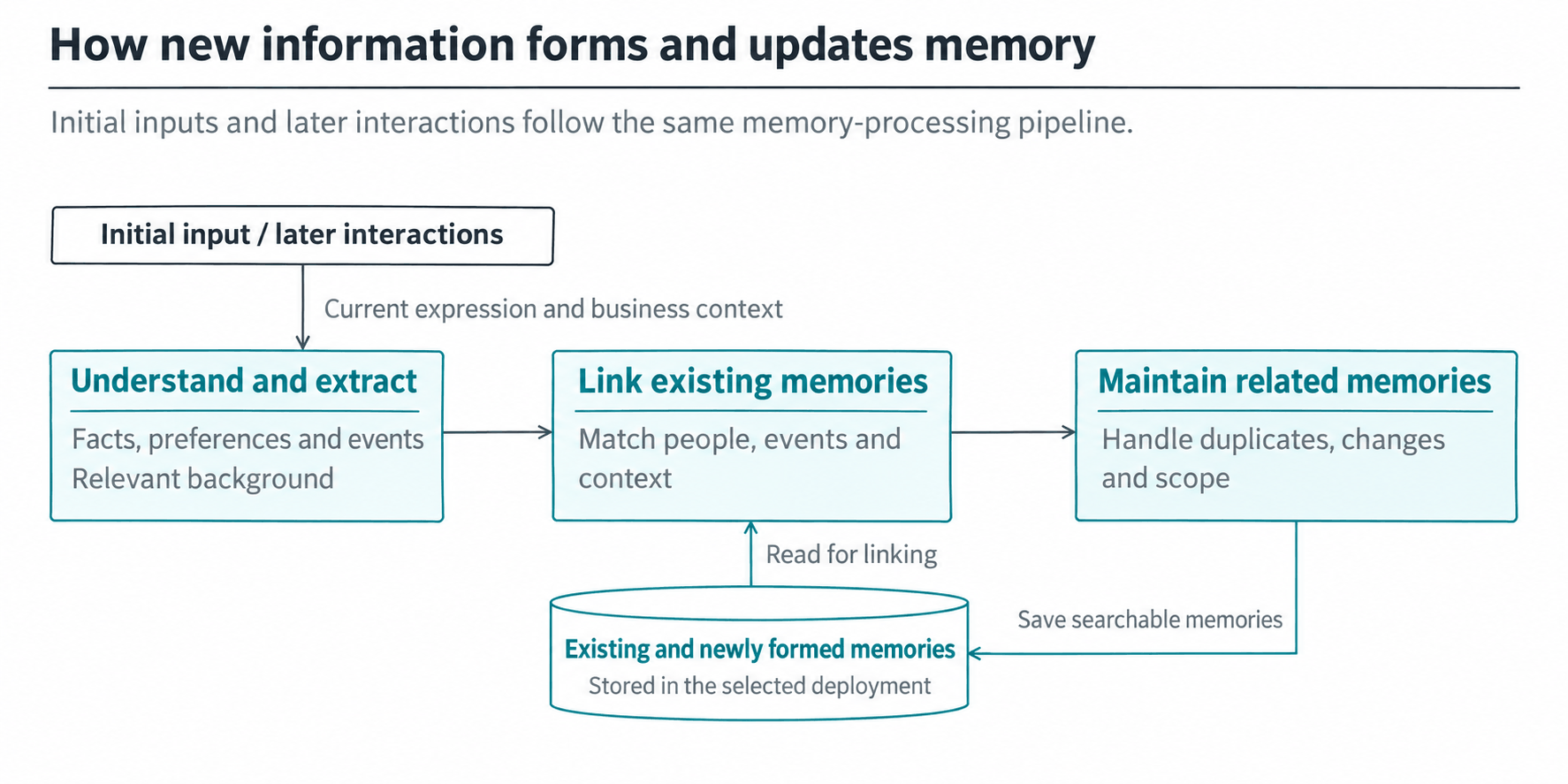
Form memories and maintain them as new inputs arrive
MemOS understands facts, preferences, events and context in the input, links them to the same user's existing memories, and handles duplicates, changes and scope. It saves newly formed or updated memories and their indexes to the data nodes of the selected deployment. Later expressions and business context follow the same processing path. The integration does not need to locate old memories and decide how to overwrite them first.
Users can view, correct or delete existing memories through management features provided by the product. Everyday updates continue to enter through the normal input flow. See Memory Types and Add Message for memory categories and processing details.
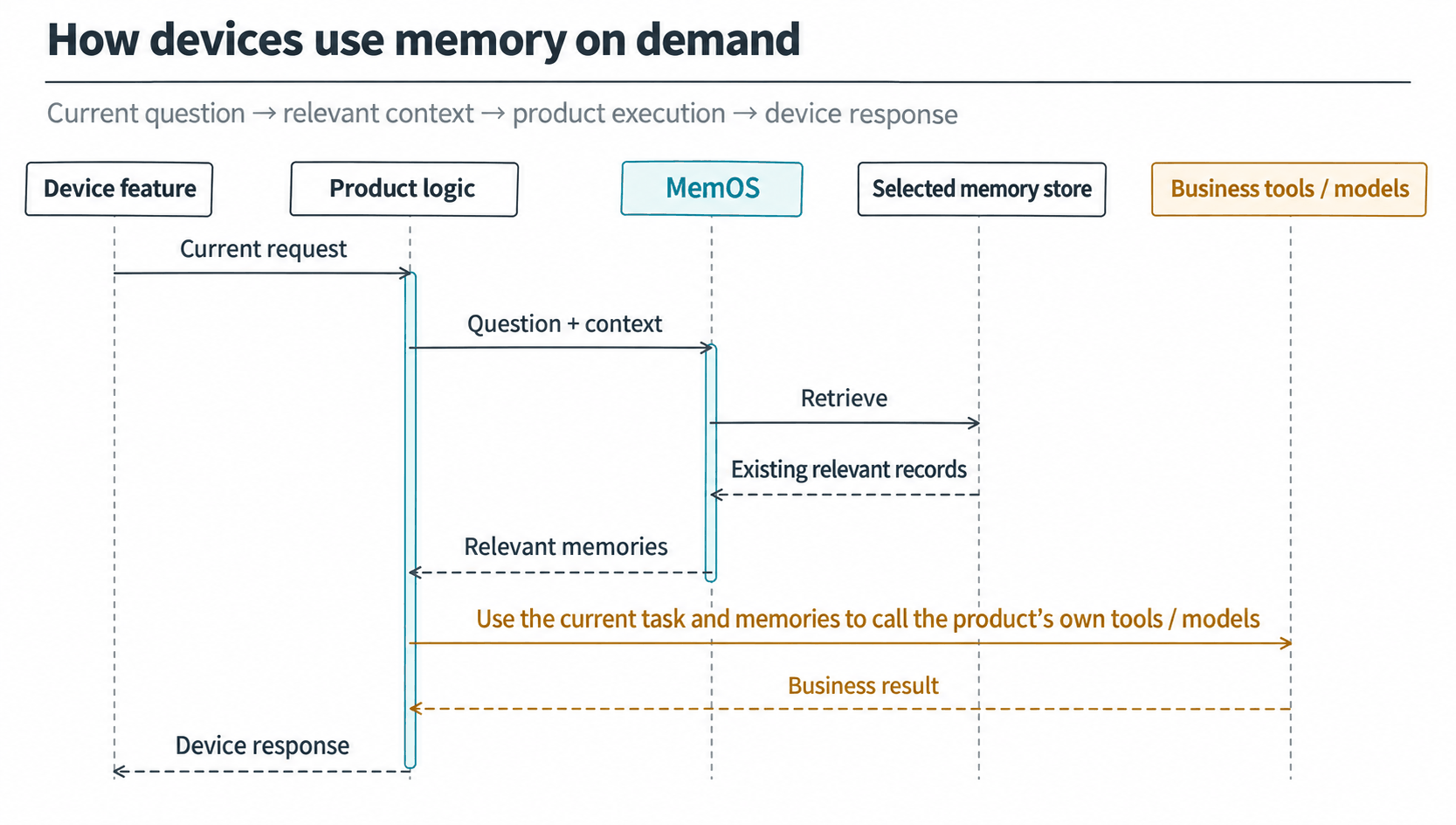
Retrieve relevant memory for the current device feature
The product queries MemOS with the current question and context. MemOS retrieves relevant content from stored memories and indexes, then returns it to the product's business services, tools or models. The product completes the current feature and presents the result on the device. MemOS supplies memory context; product features perform route planning, content recommendations, calculations and device actions. New interactions and business outcomes can become inputs for later memory maintenance.
Earbuds, phones and home speakers can each use their own conversations to query the same user's accumulated memories. Adding another device does not change where the data is stored.
Deployment options
Providing persistent memory for earbuds, watches, phones or computers involves four decisions: where MemOS runs, where memory data is stored, where LLM computation happens and how devices access the services.
The following four common patterns show how these parts work together.
| Deployment pattern | MemOS and memory data | LLM location | Device access |
|---|---|---|---|
| Home hub with edge–cloud collaboration | MemOS runs on the home hub; memories and indexes stay local | Customer-hosted or selected remote LLM | Devices access the hub. Requests undergo local privacy processing before remote inference; results return to the hub for storage and use. |
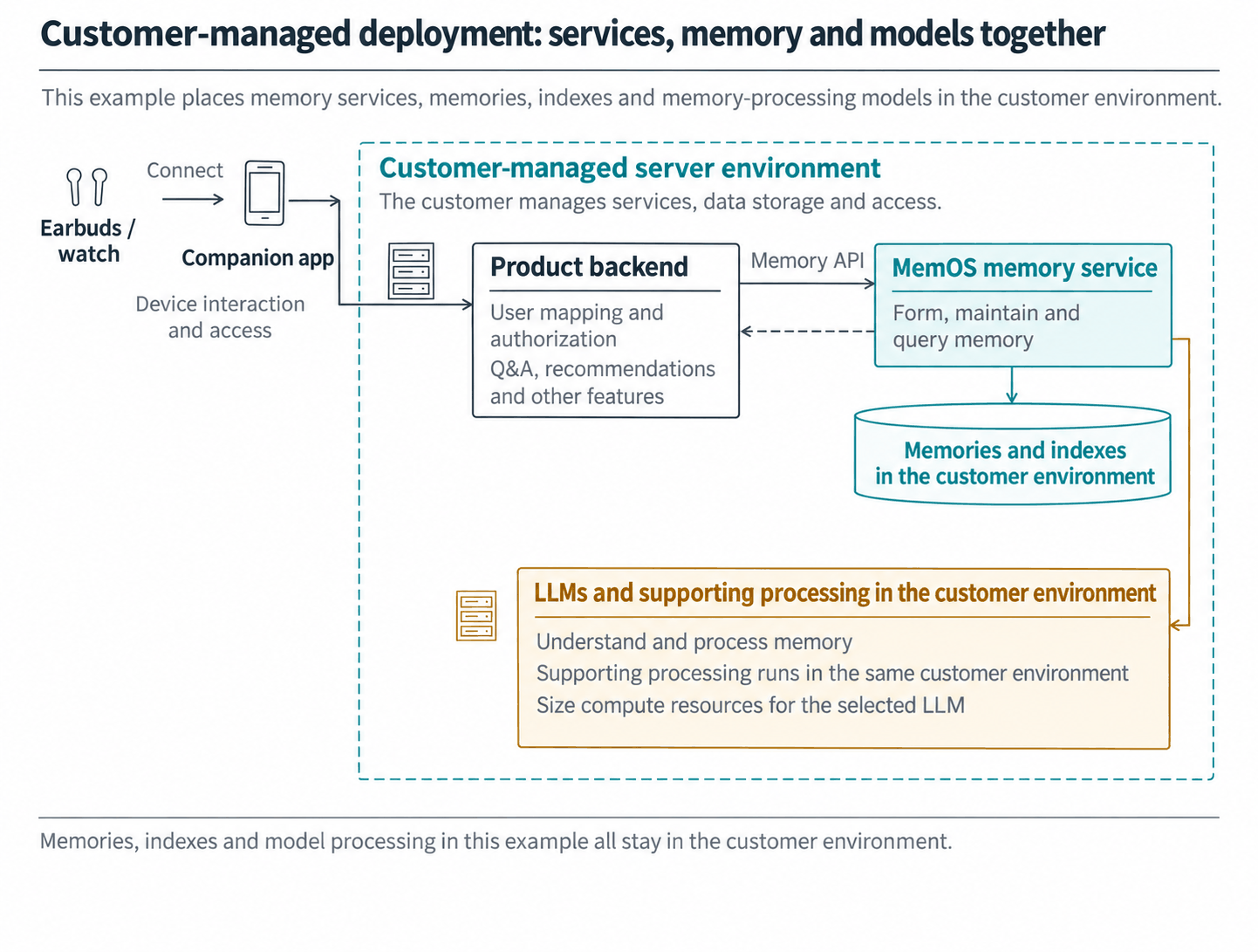
| Customer-managed deployment | Customer-managed servers; the customer stores and manages the data | In this example, LLMs and supporting processing run in the customer environment | Devices write and query memory through the product backend, then use it in product features. |
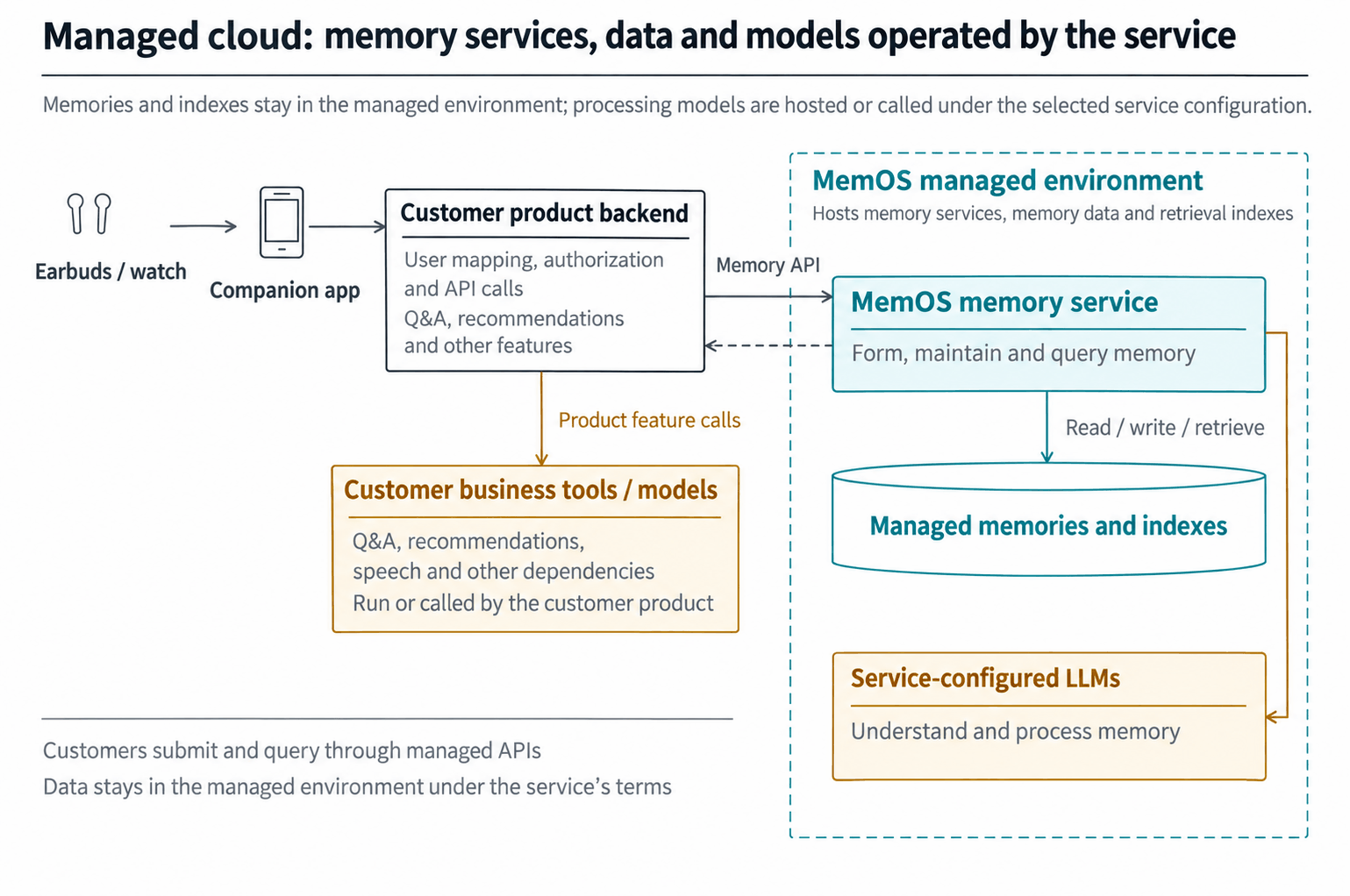
| MemOS managed service | MemOS runs and stores data in its managed environment | The managed service provides the LLMs needed for memory processing | The product backend calls the managed APIs and uses the returned memories in its own features. |
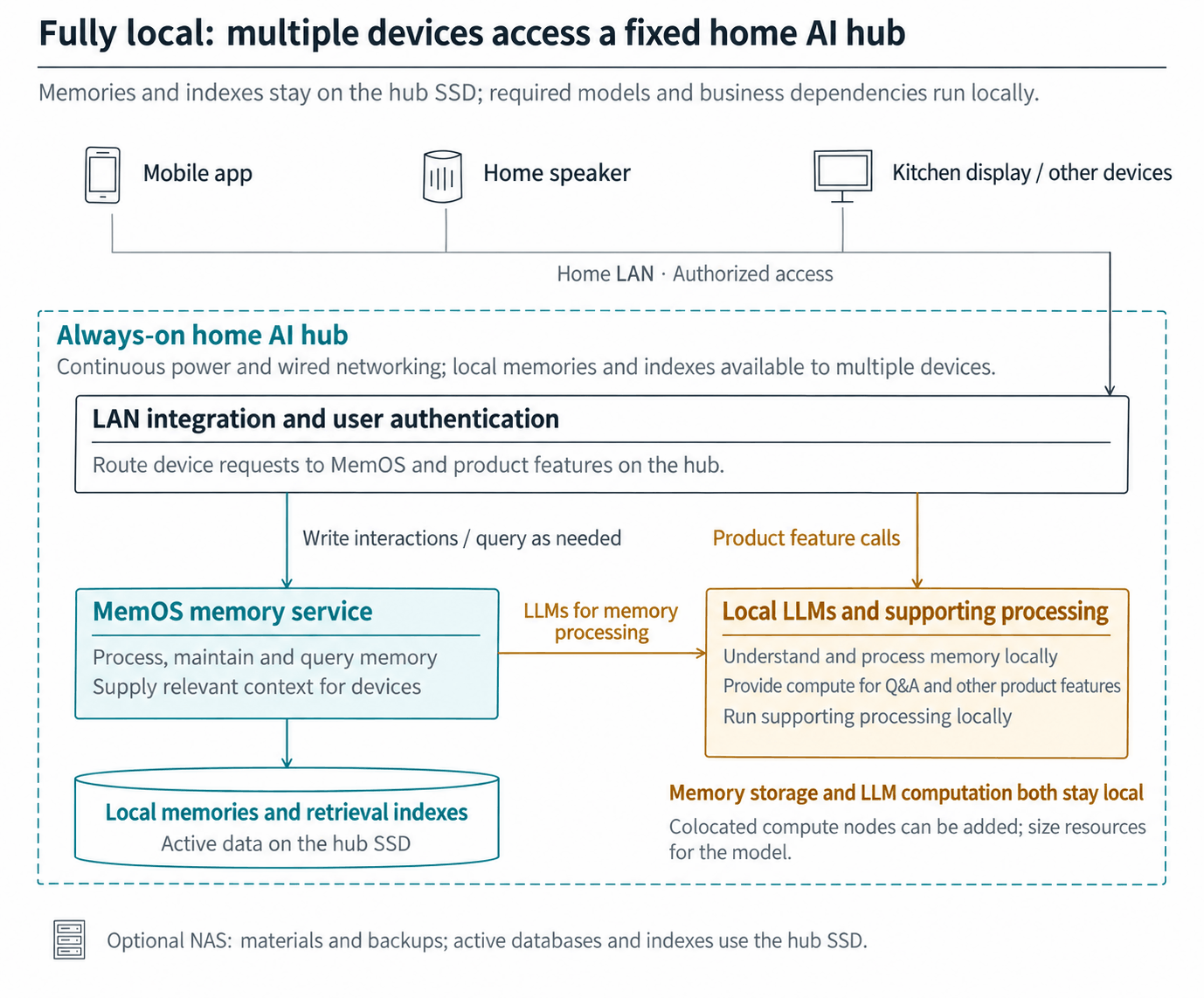
| Fully local home hub | MemOS, memories and indexes run on the home hub or colocated nodes | LLMs and supporting processing also run locally | Devices access local memory and product features over the home network. |
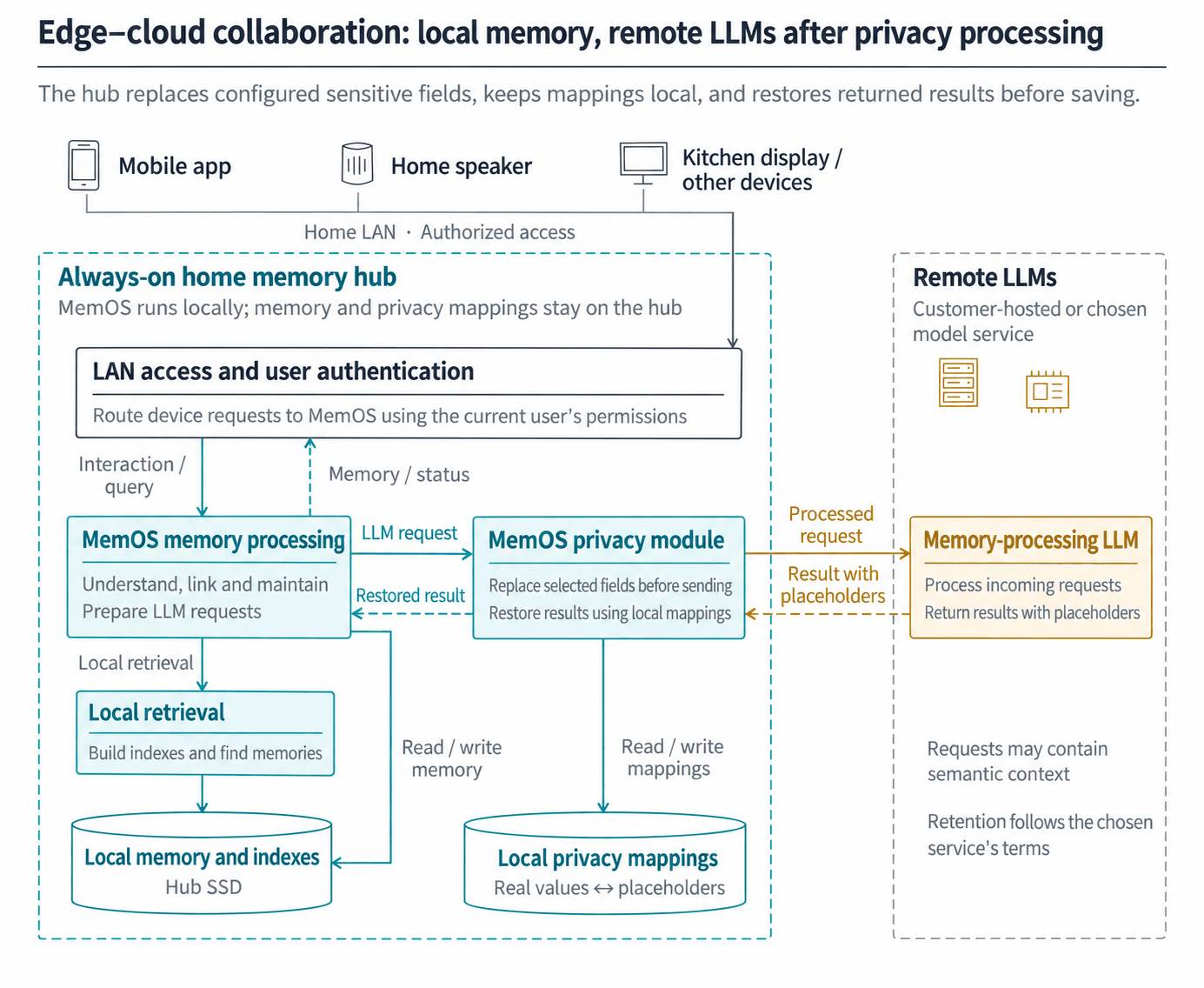
Edge–cloud collaboration: local memory with privacy processing before remote LLM calls
This pattern keeps memory local, processes configured sensitive information on the hub and calls remote LLMs as needed. Mobile apps, home speakers, kitchen displays and other devices access MemOS on the home hub through authorized entry points. Memories, retrieval indexes and mappings between real values and placeholders remain on the hub.
LLMs run on the customer's inference servers or a selected model service. The internal MemOS privacy module replaces selected information locally and restores returned results. Requests that need a remote model during memory processing or querying follow the corresponding privacy path. In this example, lightweight tasks such as retrieval remain on the hub, and devices receive usable memory context with the original values restored.
An always-on mini PC or home server can serve as the hub. For a household with a few users, 32 GB of RAM, a 1 TB NVMe SSD and Gigabit or 2.5 GbE wired networking provide a reference configuration. The hub handles local services, memory storage, retrieval, privacy processing and device access, while remote nodes handle LLM computation.
The hub stays in a fixed location with continuous power and network access. It keeps running when a phone or laptop leaves. Devices at home connect over the LAN; remote access uses a controlled gateway or companion service.
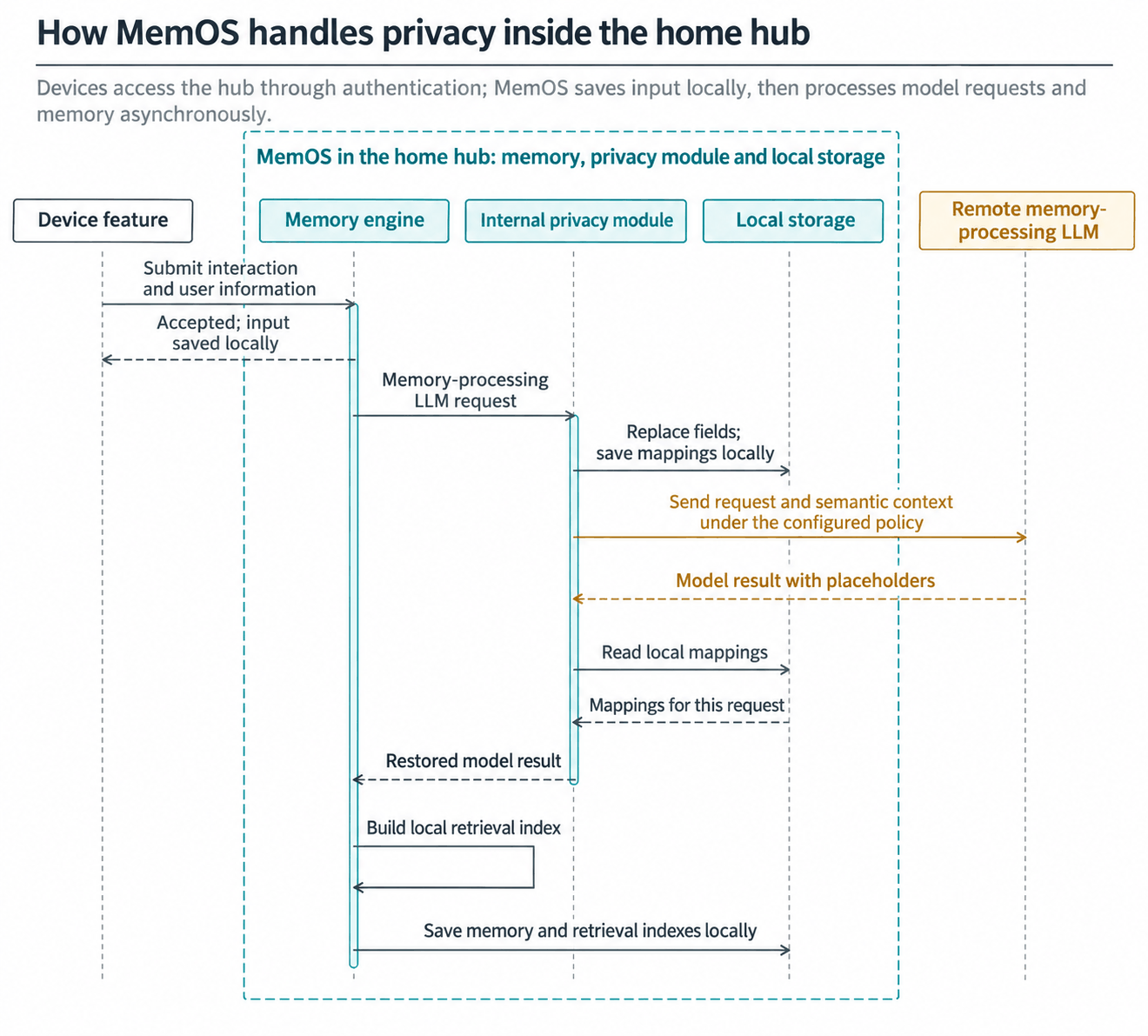
Memory writes first save the input record and return an acknowledgment. Privacy processing and LLM calls then run in the background.
How MemOS on the home hub handles sensitive information in remote requests
For example, a phone or home speaker submits an interaction containing a friend's name, a meeting time and an address through the hub's integration service. When MemOS prepares a memory-processing request, its internal privacy module replaces the selected name and address with placeholders and keeps the mappings on the hub. After the remote model returns a result, MemOS restores those values internally and continues organizing, maintaining and storing the memory.
MemOS receives: Meet at Wang Chen's home at 10 a.m. on Saturday. The address is a particular apartment in a residential complex.
Sent to the model after internal processing: Meet at [PERSON_01]'s home at 10 a.m. on Saturday. The address is [ADDRESS_01].
Local hub mappings: [PERSON_01] → Wang Chen; [ADDRESS_01] → the specified residential complex, building and apartment.
After the model returns: MemOS restores the selected values internally, then continues organizing and saving memory.
Customer-managed deployment: run MemOS on customer-controlled servers
A customer-managed deployment can use public-cloud infrastructure. A customer can rent servers in its own public-cloud account, deploy services, store data and manage LLMs there. This is still a customer-managed deployment. It differs from both a local hub in an end user's home and direct use of the MemOS managed service.
Consider an earbud manufacturer. The earbuds connect to the manufacturer's product backend through a companion mobile app. The backend handles accounts, authorization and business requests. MemOS runs on customer-managed servers, with input records, formed memories and retrieval indexes stored on customer-selected data nodes. In this example, LLMs also run in the customer environment to support memory understanding, organization and maintenance. The customer can use data-center servers, existing virtual machines or servers in its own cloud account.
After a device submits information, MemOS saves the record and calls the LLM in the background to process and maintain memory. When context is needed later, MemOS retrieves relevant memories from customer-stored data and returns them to the product backend for Q&A, recommendations or planning. The customer manages services, data, LLMs and access permissions throughout.
If an external LLM API is used instead, the memory store can remain in the customer environment, while the relevant request content is sent to that service.
Managed cloud service: use memory services operated by MemOS
Using the same earbud and companion-app example, the customer's product handles device interactions and business features, while the product backend calls the MemOS managed APIs. MemOS runs in the managed environment, which stores memories and indexes and provides the LLMs and supporting processing needed for memory operations. The customer does not need to maintain servers or LLM runtimes for these memory capabilities.
For writes, the product backend submits authorized information and receives an acknowledgment; MemOS processes and stores it in the background. For queries, the product submits the current question and receives relevant memories to use in its own Q&A, recommendations or planning features. The customer product still manages the models and tools used by those business features and identifies which memory content they receive during integration.
The user's memories accumulate in the managed environment. Devices access them through the product backend under its authorization controls.
Fully local operation: memory and models on a fixed home AI hub
To keep both memory and LLM computation at home, use a fixed host with sufficient compute capacity, such as a compact AI workstation or home server. Phones, speakers, kitchen displays and other devices access it through authorized entry points on the home network.
This pattern keeps memory storage and LLM computation local. MemOS runs on the hub, memories and indexes reside on its local SSD, and LLMs and supporting processing run on the hub or colocated fixed nodes. MemOS saves, processes and maintains submitted information locally. When context is needed, it retrieves local memories for the current product feature.
The diagram also places business models for Q&A, speech and similar features locally. Fully offline operation requires local tools and reference materials as well, with the actual capabilities of the entire chain verified. One host can handle services, storage and LLMs, or connect to colocated compute nodes. For a household with a few users, a compact AI host with 64–128 GB of unified memory and 2–4 TB of SSD storage provides a reference resource range. With a discrete GPU, size system RAM and VRAM separately, then validate against the selected LLM, context length and concurrency. See the DGX Spark hardware documentation for an example compact form factor.
Manage retained source materials, memory backups and logs using local directories and permissions. A NAS can store materials and backups. Whether an existing NAS can also run the memory service or an LLM depends on its processor, memory and software environment.
API integration: writes, status tracking and memory queries
After choosing a deployment, connect information ingestion, processing-status tracking and memory queries. The examples below use the MemOS managed API, followed by the integration flow for a home hub. Replace demonstration users and credentials with your actual configuration.
Backend APIs: asynchronous writes and queries across devices
In this managed-API example, the product backend holds the project API key and checks user access against the product's account system. For customer-managed deployments, use the service addresses, authentication and APIs specified for the delivered version. user_id identifies the memory user, and conversation_id identifies the current conversation. Different devices belonging to the same user can use separate conversation IDs. See Project Configuration for the scope of API keys.
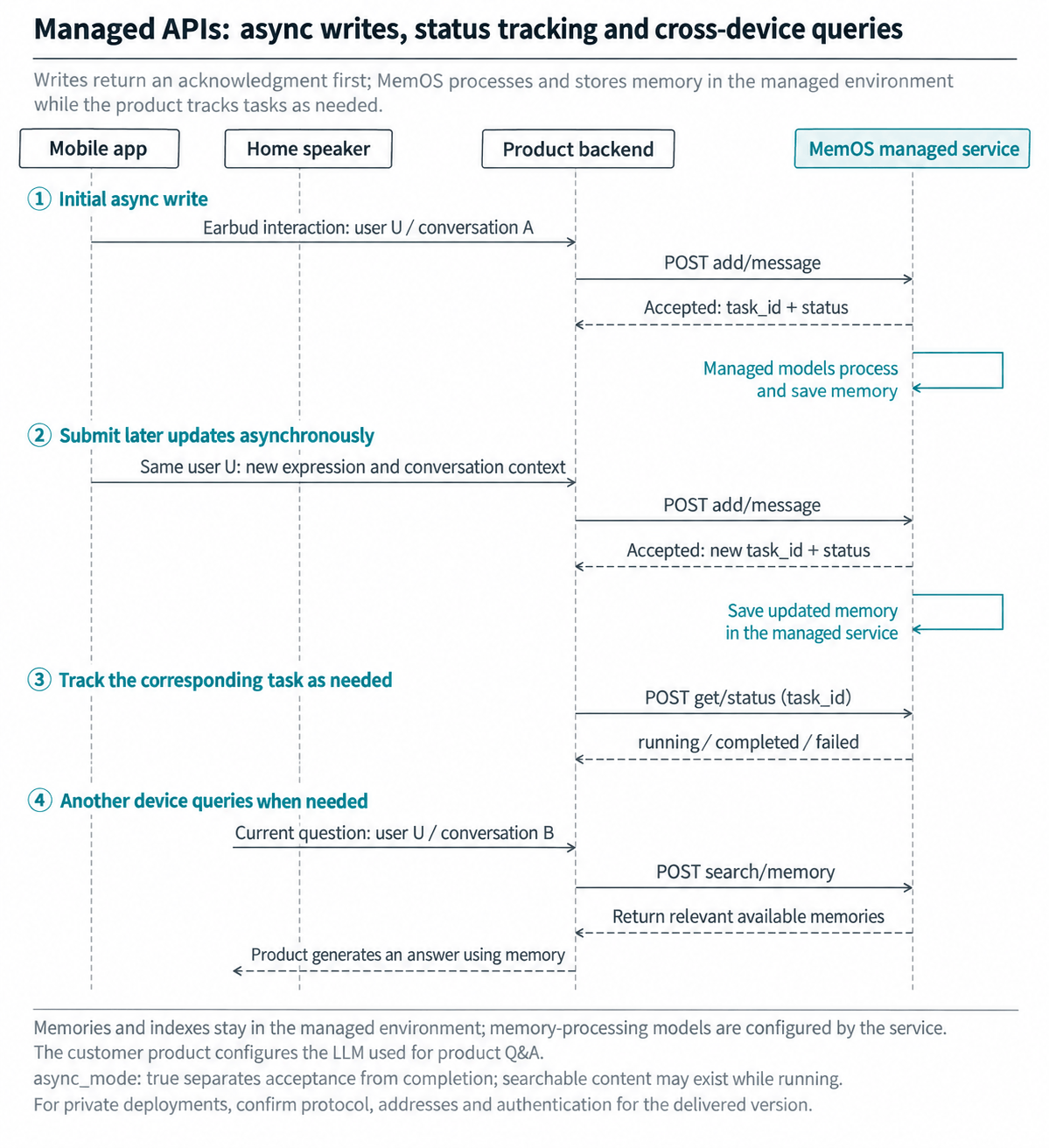
After the mobile app transcribes an earbud interaction, the product backend submits the full expression for MemOS to process:
curl --request POST \
  --url 'https://memos.memtensor.cn/api/openmem/v1/add/message' \
  --header 'Authorization: Token YOUR_MEMOS_API_KEY' \
  --header 'Content-Type: application/json' \
  --data '{
    "user_id": "demo_user_001",
    "conversation_id": "weekend_plan_001",
    "messages": [
      {"role": "user", "content": "I want to take my parents to Suzhou on Saturday morning and return on Sunday evening. Also, my mom cannot eat spicy food."}
    ],
    "async_mode": true
  }'
This example uses async_mode: true. The write API returns an acknowledgment with data.task_id and data.status. MemOS continues processing in the background and saves memories and indexes according to the managed-service configuration. Acceptance and processing completion are separate states. The product backend stores the task ID to track progress as needed. See Add Message API and Async Mode for fields and processing behavior.
On Friday, the user adds in the mobile app: “I have something to do on Saturday morning. Let's leave after lunch and visit the gardens on Sunday.” The product backend submits the new expression and conversation context asynchronously and records the new task ID. To check the complete processing result of a write or update, query its corresponding task_id:
curl --request POST \
  --url 'https://memos.memtensor.cn/api/openmem/v1/get/status' \
  --header 'Authorization: Token YOUR_MEMOS_API_KEY' \
  --header 'Content-Type: application/json' \
  --data '{"task_id": "YOUR_TASK_ID"}'
The task's data.status can be running, completed or failed. During integration testing, inspect the complete processing result after completed. In production, queries can use memories that have already been processed and made available; searchable content may exist while a task is still running. See Get Task Status for status fields and failure information.
Back at home, the user asks the home speaker about the trip. The speaker service queries through the product backend using the same user_id and the current speaker conversation's conversation_id:
curl --request POST \
  --url 'https://memos.memtensor.cn/api/openmem/v1/search/memory' \
  --header 'Authorization: Token YOUR_MEMOS_API_KEY' \
  --header 'Content-Type: application/json' \
  --data '{
    "user_id": "demo_user_001",
    "conversation_id": "home_speaker_continue_002",
    "query": "What is the latest plan for our weekend trip to Suzhou? Anything else to keep in mind?"
  }'
The current conversation ID contributes query context; devices can use separate conversations. In the response, facts appear in data.memory_detail_list[].memory_value, and preferences in data.preference_detail_list[].preference. The product backend passes relevant memories to its Q&A or itinerary features to generate the speaker's answer. The mobile app can also query and use memories on its planning page. Actual retrieval depends on the inputs and processing results. See Search Memory API for response fields.
During integration testing, use the same demo user for the initial write, a later update and a query from another device. Verify processing status, retrieved content and how the product uses the result. For precise management of existing content, connect Update Memory and Delete Memory to the product's memory-management interface.
Hub APIs: local writes and queries
When MemOS runs on a home hub, phones, speakers and other devices submit information and query memories through the hub's authorized service entry points. The edge–cloud and fully local patterns share the same memory workflow, with memories and indexes stored locally on the hub. LLM placement follows the deployment pattern described above.
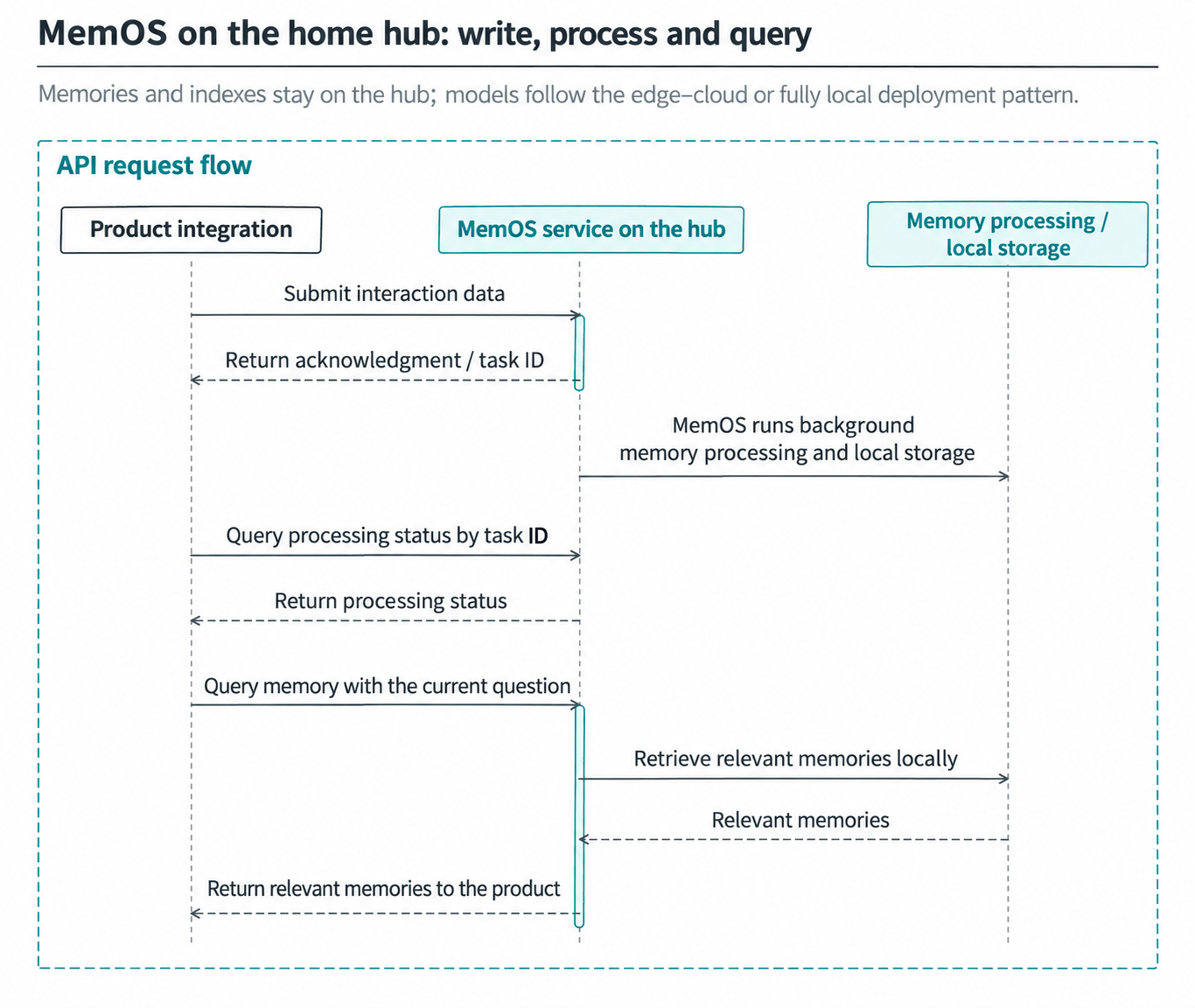
The examples below follow the MemOS Cloud API format. First set MEMOS_ADD_MESSAGE_URL, MEMOS_GET_STATUS_URL and MEMOS_SEARCH_MEMORY_URL to the full write, status-query and memory-search endpoint URLs provided by your hub deployment. Set MEMOS_API_KEY to the access credential. Actual addresses, paths, authentication and storage configuration depend on the delivered version.
Write interaction data. Submit the full expression together with user and conversation identifiers to MemOS on the hub:
curl --request POST \
  --url "${MEMOS_ADD_MESSAGE_URL}" \
  --header "Authorization: Token ${MEMOS_API_KEY}" \
  --header 'Content-Type: application/json' \
  --data '{
    "user_id": "demo_user_001",
    "conversation_id": "home_hub_dinner_001",
    "messages": [
      {"role": "user", "content": "I am exhausted after work. Let us keep dinner simple. Oh, and no cilantro."}
    ],
    "async_mode": true
  }'
After the write API acknowledges the request, MemOS forms, maintains and saves memories in the background. The integration stores the returned data.task_id and uses it to query processing status. Replace YOUR_TASK_ID below with that task ID. data.status is running, completed or failed. Memory queries use content that has already been processed and made available.
curl --request POST \
  --url "${MEMOS_GET_STATUS_URL}" \
  --header "Authorization: Token ${MEMOS_API_KEY}" \
  --header 'Content-Type: application/json' \
  --data '{"task_id": "YOUR_TASK_ID"}'
Query relevant memories. When the user later asks the home speaker about dinner, query MemOS as the same user with the current question:
curl --request POST \
  --url "${MEMOS_SEARCH_MEMORY_URL}" \
  --header "Authorization: Token ${MEMOS_API_KEY}" \
  --header 'Content-Type: application/json' \
  --data '{
    "user_id": "demo_user_001",
    "conversation_id": "home_speaker_dinner_002",
    "query": "What should we have for dinner tonight? Something easy to make."
  }'
MemOS retrieves relevant content from the hub's stored memories and indexes and returns it to the product's Q&A or menu-planning feature. The product combines the current question and relevant memories to generate an answer.
During integration testing, verify that processing status can be tracked for writes and queries return useful context. Also check memory retrieval after a restart and the scope of backups and deletion. See Quick Start for more backend integration examples.