Build a Memory-Enhanced Knowledge Base Q&A Assistant
1. Overview
In AI application development, building a Q&A assistant that can understand context and remember historical interactions has always been a core requirement. Traditional large language models are powerful, but they lack long-term memory—every conversation starts over as if the model has “amnesia.” RAG (Retrieval-Augmented Generation) can retrieve relevant knowledge, but it still can’t truly “remember” user preferences or past interactions.
MemOS provides a complete memory operating system ecosystem that gives AI applications real long-term memory. With a MemOS-powered knowledge base, you can provide contextual information to an LLM via prompts, enabling more accurate and personalized responses. This experience is significantly better than chatting with a generic LLM on the public internet.
1.1 MemOS Memory Layer vs RAG: Key Differences
The core issue with traditional RAG is: it is stateless. Each query is independent. The system can only retrieve static knowledge based on semantic similarity, but it cannot remember “who you are,” “what you said before,” or “what you prefer.” It’s like a librarian with amnesia—every time you walk in, they have to ask your needs from scratch, and they can’t personalize recommendations based on your reading history.
The core value of the MemOS memory layer is: it gives AI applications long-term memory. It can not only retrieve knowledge, but also understand relationships, time, and preferences, and connect the current question with historical memory—so it searches and uses knowledge “with background.” As users keep interacting, MemOS continuously evolves and updates memory from conversation content, enabling the knowledge base to iterate and “self-evolve.”
| Dimension | Traditional RAG | MemOS Memory Layer |
|---|---|---|
| Memory capability | Can retrieve, cannot remember — retrieves static knowledge by vector similarity; cannot dynamically record user interaction history | Dynamic memory — automatically captures, stores, and manages conversation history and user behavior |
| Personalization | Lacks personalization — cannot adjust answers based on the user’s past behavior | Personalized experience — provides tailored answers based on historical preferences |
| Context management | Fragmented context — hard to manage related info across multi-turn conversations | Intelligent association — builds relationships between memories through semantic understanding |
| Knowledge updates | Hard to update — adding new knowledge often requires rebuilding vector indexes | Real-time updates — supports incremental memory updates and priority management |
1.2 Real-World Scenario Comparison: Enterprise Knowledge Base Assistant
Let’s look at one real business scenario to clearly see the difference between RAG and MemOS:
DAY 1 Employee asks: My computer is a MacBook Pro 13-inch with an Intel chip. How do I install the company intranet proxy?
DAY 1 The assistant provides Intel-version installation steps.
DAY 20 Employee asks: The intranet proxy stopped working—what version should I reinstall?
The Problem with a RAG Approach
# Retrieve content related to "intranet proxy" and "not working",
# but cannot recall "the user's device model"
Retrieved knowledge:
1. Common intranet proxy troubleshooting
2. Mac M1/M2 (ARM) proxy installation instructions
3. Windows intranet proxy client installation instructions
4. Network connectivity and certificate issues
5. General FAQ

❌ Knowledge Base Assistant: Please reinstall the latest Mac M1/M2 (ARM) version or the Windows intranet proxy client. Here are the steps: ...
The Advantage of MemOS
# Retrieve memories related to "intranet proxy" and "not working",
# and automatically identify the employee's device model
Retrieved memories:
1. The user installed the company intranet proxy 20 days ago; their device is a MacBook Pro 13 (Intel)
2. Common intranet proxy troubleshooting
3. Intel-version intranet proxy installation instructions

✅ Knowledge Base Assistant: You’re using an Intel-based MacBook Pro, so we recommend reinstalling the Intel version of the intranet proxy client. Here’s the Intel download link and installation steps: ...
1.3 Why MemOS?
From the scenario above, you can clearly see three core advantages of MemOS over traditional RAG:
- Understands users: automatically fills in context
RAG is good at retrieving knowledge semantically related to a query, but it is stateless—each query stands alone, with no understanding of the user or context. Users must repeat their background every time.
MemOS can understand relationships, time, and preferences. It knows “who you are” and “what you’re doing.” You can simply ask your question, and MemOS will fill in the missing context automatically—no need to repeat things like “my dog doesn’t eat chicken” or “my computer has an Intel chip.” - Personalization: remembers habits and preferences
Users in different roles and work styles need different service approaches. MemOS can remember:
"This customer doesn’t like overly aggressive sales pitches"
"You use Python more often than Java"
"You asked about reimbursement policy last time—do you want to proceed with the application flow now?"
This personalization makes an AI application truly “your” assistant, not just a generic tool. - Knowledge evolution: keeps learning from interactions
When a real process contains “experience rules” that aren’t documented, MemOS can distill them into new memories, continuously filling gaps and improving the knowledge system. As end users keep using it, MemOS evolves and updates memory based on conversations—so the knowledge base becomes part of “memory,” not just a static document store.
On this foundation, MemOS 2.0 provides knowledge base and multimodal capabilities. Developers can connect business documents to MemOS and quickly build an assistant that understands users—especially when combined with open-source LLMs.
2. Setup Tutorial
2.1 Prepare the Knowledge Base (5 min)
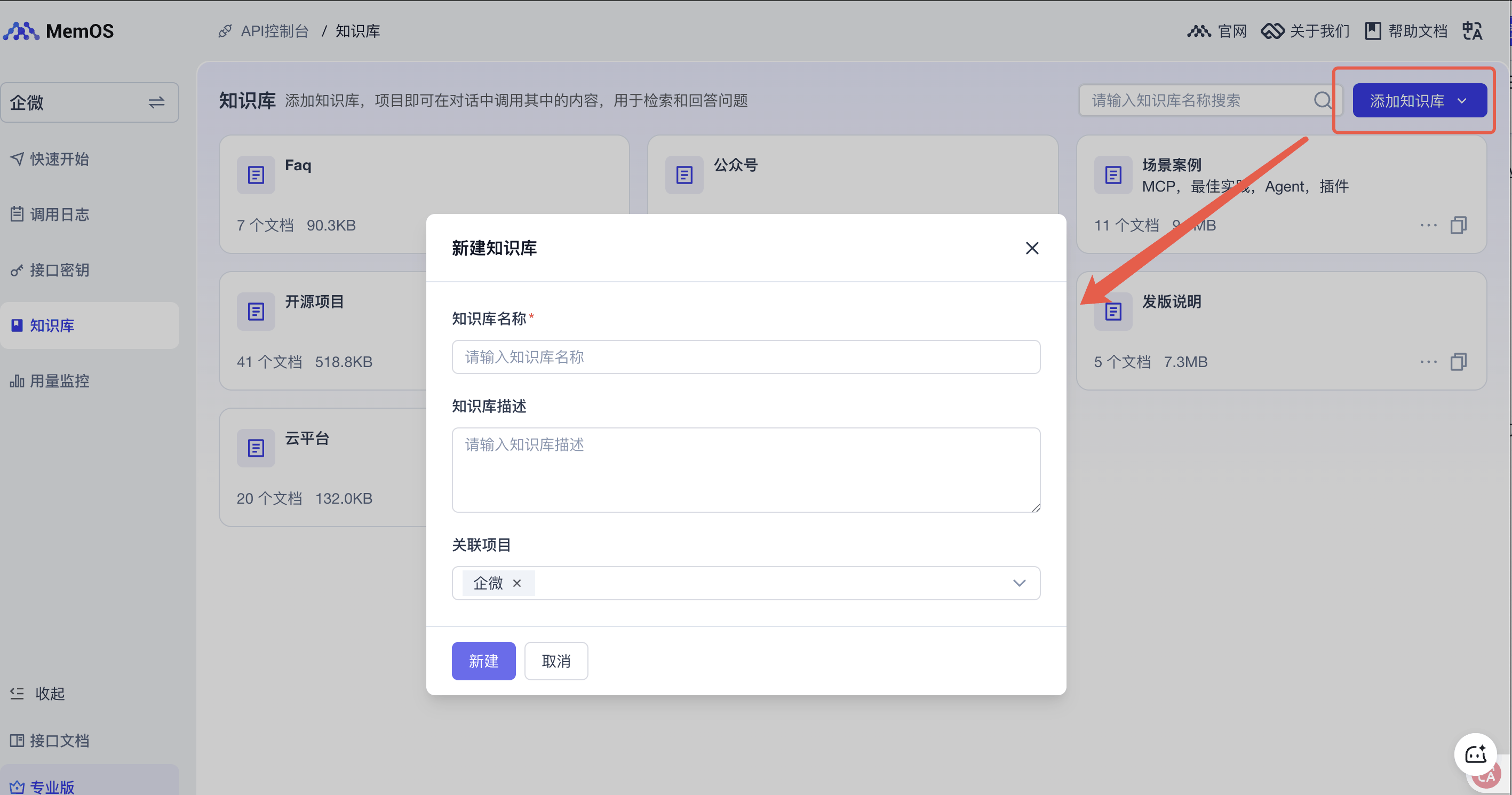
Create a knowledge base
Create a knowledge base via the Console or API. This article categorizes documents based on MemOS official docs, MemTensor’s past announcements, and release notes to make future updates and management easier. In this example, you can create just one knowledge base and upload a subset of documents for testing.
Upload documents
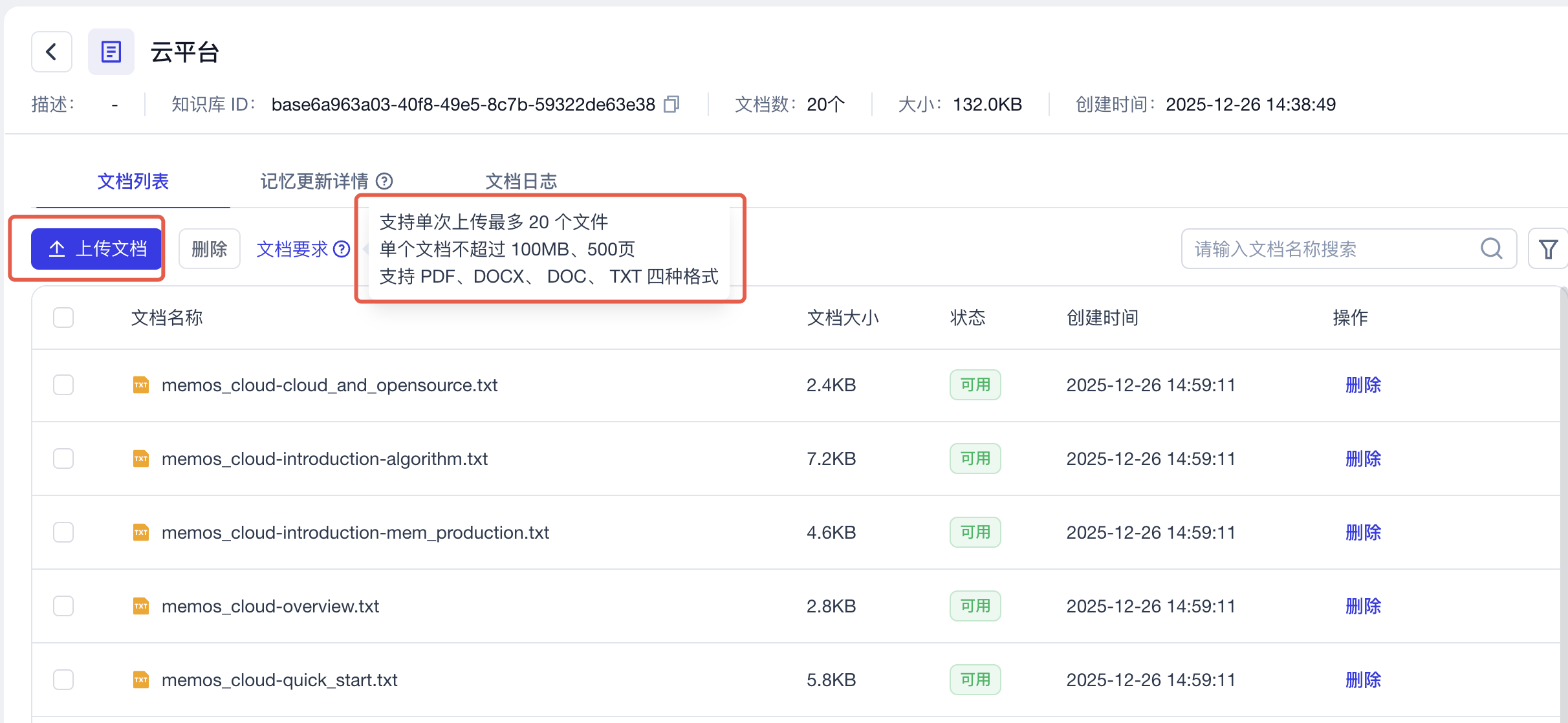
Enter the knowledge base and upload your documents. Note the document requirements: MemOS-Docs are in MD format; you can use an AI tool to convert them to TXT format with one click, then upload them. When uploading, pay attention to the requirements. The rest—storage, parsing, chunking, and memory generation—is handled by MemOS. Just wait until processing finishes and the status shows “Available.”
2.2 Run the Code (5 min)
The following demo is shown using a Python runtime.
2.2.1 Copy the complete runnable code
import os
import requests
import json
from openai import OpenAI
from datetime import datetime

# Get MEMOS_API_KEY from the cloud console
os.environ["MEMOS_API_KEY"] = "mpg-xxx"
# Replace with your OpenAI API key
os.environ["OPENAI_API_KEY"] = "sk-xxx"
os.environ["MEMOS_BASE_URL"] = "https://memos.memtensor.cn/api/openmem/v1"
# Replace with your own knowledge base IDs (these are examples only)
os.environ["KNOWLEDGE_BASE_IDS"] = json.dumps([
  "based540fb25-ddf1-4456-935b-41d901518e04",
  "base3908d457-da43-4dde-989e-020be132eff4",
  "base1db3a7ea-6ecc-4925-881a-e87800da8d2e"
])

openai_client = OpenAI(api_key=os.getenv("OPENAI_API_KEY"))

class KnowledgeBaseAssistant:

    def __init__(self):
        self.openai_client = openai_client
        self.base_url = os.getenv("MEMOS_BASE_URL")
        self.knowledge_base_ids = json.loads(os.getenv("KNOWLEDGE_BASE_IDS"))
        self.headers = {
          "Content-Type": "application/json",
          "Authorization": f"Token {os.environ['MEMOS_API_KEY']}"
        }

    def search_memory(self, query, user_id):
      """Query relevant memory"""
      data = {
        "query": query,
        "user_id": user_id,
        "conversation_id": user_id,
        "knowledgebase_ids": self.knowledge_base_ids
      }
      res = requests.post(f"{self.base_url}/search/memory", headers=self.headers, data=json.dumps(data))

      if res.json().get('code') != 0:
        print(f"❌ Memory search failed, {res.json().get('message')}")
        return [], []

      memory_detail_list_raw = res.json().get('data').get('memory_detail_list', [])
      # Filter out memories with relevancy < 0.5
      memory_detail_list = [
          x for x in memory_detail_list_raw
          if x.get('relativity', 0) >= 0.5
      ]
      preference_detail_list = res.json().get('data').get('preference_detail_list')

      return memory_detail_list, preference_detail_list

    def build_system_prompt(self, memories, preferences):
        """Build a system prompt that contains formatted memory"""
        base_prompt = """
          # Role
          You are the MemOS assistant, nicknamed XiaoYi🧚 — an AI assistant built around a “memory operating system” created by MemTensor. MemTensor is an AI research company based in Shanghai, guided by academicians of the Chinese Academy of Sciences. MemTensor is committed to the vision of "low cost, low hallucination, high generalization", exploring AI development paths suited to China’s context and advancing trustworthy AI adoption. MemOS’s mission is to equip LLMs and autonomous agents with “human-like long-term memory,” turning memory from a black box inside model weights into a core resource that is “manageable, schedulable, and auditable.” Your responses must comply with legal and ethical standards and applicable laws and regulations, and must not generate illegal, harmful, or biased content. If you encounter such requests, you must refuse clearly and explain the relevant legal or ethical principles. Your goal is to combine retrieved memory snippets to provide highly personalized, accurate, and logically rigorous answers.

          # System Context
          - Current time: {current_time} (use this as the reference for judging memory freshness)

          # Memory Data
          Below is information retrieved by MemOS, divided into “Facts” and “Preferences”.
          - **Facts**: may include user attributes, conversation history, or third-party info.
            - **Important**: content marked as `[assistant观点]` or `[模型总结]` represents **past AI inference** and is **not** the user’s original statement.
          - **Preferences**: explicit/implicit user requirements for style, format, or logic.

          <memories>
          {memories}
          </memories>


          <preferences>
          {preferences}
          </preferences>

          # Critical Protocol: Memory Safety
          Retrieved memories may contain **AI’s own speculation**, **irrelevant noise**, or **wrong subject attribution**. You must strictly execute the following **“four-step judgment.”** If a memory fails **any** step, you must **discard** that memory:

          1. **Source Verification**
            - **Core**: distinguish “the user’s original words” from “AI speculation.”
            - If a memory carries labels like `[assistant观点]`, it only indicates the AI’s past **assumption** and must **not** be treated as a definitive user fact.
            - *Counterexample*: a memory says `[assistant观点] The user loves mangoes`. If the user never said it, do not assume they like mangoes—avoid self-reinforcing hallucinations.
            - **Principle**: AI summaries are for reference only and have far lower weight than the user’s direct statements.

          2. **Attribution Check**
            - Is the actor/subject in the memory actually “the user”?
            - If the memory describes a **third party** (e.g., “candidate”, “interviewee”, “fictional character”, “case data”), you must never attribute those properties to the user.

          3. **Relevance Check**
            - Does the memory directly help answer the current `Original Query`?
            - If it’s only a keyword match (e.g., both mention “code”) but the context is completely different, you must ignore it.

          4. **Freshness Check**
            - Does the memory conflict with the user’s latest intent? Treat the current `Original Query` as the highest-priority source of truth.

          # Instructions
            1. **Review**: read `facts memories` first and apply the “four-step judgment” to remove noise and unreliable AI views.
            2. **Execute**:
              - **Prefer professional advice from the knowledge base** (e.g., product selection, technical solutions).
              - Use only the memories that pass filtering to enrich context.
              - Strictly follow the style requirements in `preferences`.
            3. **Output**:
              - Answer the question directly, and **do not** mention internal system terms such as “memory store”, “retrieval”, or “AI view”.
              - If the answer is not in the current knowledge base/memory system, you must say so explicitly. Never fabricate information or give vague answers under any circumstances.
            4. **Language**: respond in the same language as the user’s query.

          # Markdown-to-Plain-Text Conversion Rules
          - When you need to convert provided Markdown (MD) text into plain text, you must strictly follow these rules to ensure readability and avoid formatting errors:
          - Core formatting: WeChat does not support native MD syntax (e.g., # headings, bold text, code blocks, tables). You must simulate hierarchy using “symbols + newline + spaces”, and avoid unsupported markers.
          - Heading hierarchy: First check whether the original contains MD headings (lines starting with #). If yes: Level-1 headings use Chinese numerals like ' 一. ', ' 二. ', ' 三. ' (use '.' not '、'); Level-2 headings use Arabic numerals like '1. ', '2. ', '3. '; Level-3 and below use the '・' bullet. Numbers must auto-increment to match document structure. If the original has no MD headings: do not add heading numbering; keep the original paragraph structure. Examples: '### Title 1' → ' 一. Title 1'; '#### Title 2' → '1. Title 2'; '##### Title 3' → '・Title 3'. If no MD headings exist, keep 'Title 1' as 'Title 1'.
          - Links: Keep Markdown links in 'text' form unchanged. Do not modify or delete any link content.
          - Lists: Convert '- item' MD lists into ordered lists ('1. item', '2. item') or unordered lists (use '・item'). Each list item must be on its own line, and keep one blank line before and after each item for readability.
          - Tables: If the MD contains tables, break them into bullet-style sections like '▶ Scenario Type A: XXX' and '▶ Scenario Type B: XXX'. Under each, list items with '1. 2. 3.' without losing info and without keeping table symbols.
          - Emphasis: Do not use * or **; replace original bold content with '「XXX」'.
          - Readability: Keep one blank line between major paragraphs. For overly long technical terms or complex descriptions, simplify into more conversational wording without changing meaning. Use Chinese punctuation consistently (e.g., ▶, ・, :) and avoid mixing Chinese/English punctuation that can cause confusion.
          - Output: Only output the converted plain text; do not add extra notes (e.g., 'conversion complete'); do not change the original meaning—only replace formatting; preserve 100% of the core info (dimensions, features, links, data) without omission; final text must be copy-pastable without further editing.
          """

        # Build memory text (may be empty)
        if len(memories) > 0:
            formatted_memories = "## Related memories:\n"
            for i, memory in enumerate(memories, 1):
                formatted_memories += f"{i}. {memory.get('memory_value')}\n"
        else:
            formatted_memories = ""

        # Build preference text (may be empty)
        if len(preferences) > 0:
            formatted_preferences = "## Preferences:\n"
            for i, preference_detail in enumerate(preferences, 1):
                formatted_preferences += f"{i}. {preference_detail.get('preference')}\n"
        else:
            formatted_preferences = ""

        base_prompt = base_prompt.format(
            current_time=datetime.now().strftime('%Y-%m-%d %H:%M:%S'),
            memories=formatted_memories,
            preferences=formatted_preferences,
        )

        return base_prompt

    def add_message(self, messages, user_id):
      """Add messages"""
      data = {
        "messages": messages,
        "user_id": user_id,
        "conversation_id": user_id
      }

      res = requests.post(f"{self.base_url}/add/message", headers=self.headers, data=json.dumps(data))

      if res.json().get('code') == 0:
        print(f"✅ Added successfully")
      else:
        print(f"❌ Add failed, {res.json().get('message')}")


    def get_message(self, user_id):
        """Get messages"""
        data = {
          "user_id": user_id,
          "conversation_id": user_id,
          "message_limit_number": 15
        }
        res = requests.post(f"{self.base_url}/get/message", headers=self.headers, data=json.dumps(data))

        if res.json().get('code') == 0:
          return res.json().get('data').get('message_detail_list')
        else:
          print(f"❌ Get messages failed, {res.json().get('message')}")
          return []

    def chat(self, query, user_id):
        """Main chat function with memory integration"""
        # 1. Fetch recent conversation history
        chat_history = self.get_message(user_id)

        # 2. Search relevant memories
        memories, preferences = self.search_memory(query, user_id)

        # 3. Build system prompt with memory
        system_prompt = self.build_system_prompt(memories, preferences)

        messages = [
          {"role": "system", "content": system_prompt},
          *chat_history,
          {"role": "user", "content": query}
        ]

        # 4. Use OpenAI to generate an answer
        response = self.openai_client.chat.completions.create(
            model="gpt-4o",
            messages=messages,
            temperature=0.3,
            top_p=0.9
        )
        answer = response.choices[0].message.content

        # 5. Save the conversation into memory
        messages = [
            {"role": "user", "content": query},
            {"role": "assistant", "content": answer}
        ]
        self.add_message(messages, user_id)

        # 6. Return the answer
        return answer

ai_assistant = KnowledgeBaseAssistant()
user_id = "memos_knowledge_base_user_123"

def demo_questions():
    return [
      'Who are you?'
    ]

def main():
    print("💡 Welcome to the Knowledge Base Q&A Assistant!\n")
    print("\n🎯 Here are some sample questions—you can continue chatting with the assistant:")
    for i, question in enumerate(demo_questions(), 1):
      print(f"  {i}. {question}")

    while True:
        user_query = input("\n🤔 Enter your question (or type 'exit' to quit): ").strip()

        if user_query.lower() in ['quit', 'exit', 'q', '退出']:
            print("👋 Thanks for using the Knowledge Base Q&A Assistant!")
            break

        if not user_query:
            continue

        print("🤖 Processing...")
        answer = ai_assistant.chat(user_query, user_id)
        print(f"💡 [Assistant]: {answer}")
        print("-" * 60)


if __name__ == "__main__":
    main()
2.2.2 Initialize the runtime environment
pip install OpenAI && pip install datetime
2.2.3 Replace environment variables in the code
Get the key (API_KEY)
Log into the console at https://memos-dashboard.openmem.net/cn/apikeys/ and copy the key.
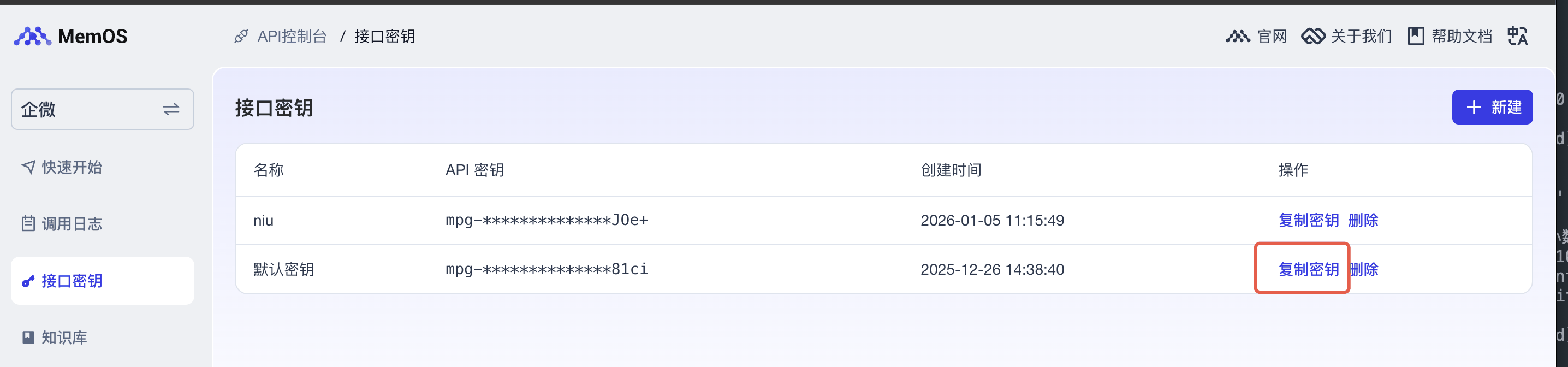
os.environ["MEMOS_API_KEY"] = "mpg-xx"
LLM client
# Replace with your OpenAI API key
os.environ["OPENAI_API_KEY"] = "sk-xx"
# [Optional] Replace with your BASE_URL
os.environ["OPEN_API_BASE_URL"] = "http://xxx.xxx"

openai_client = OpenAI(api_key=os.getenv("OPENAI_API_KEY"), os.getenv("OPEN_API_BASE_URL"))
Get the knowledge base ID
For the knowledge base you just uploaded to, copy the ID and save it.
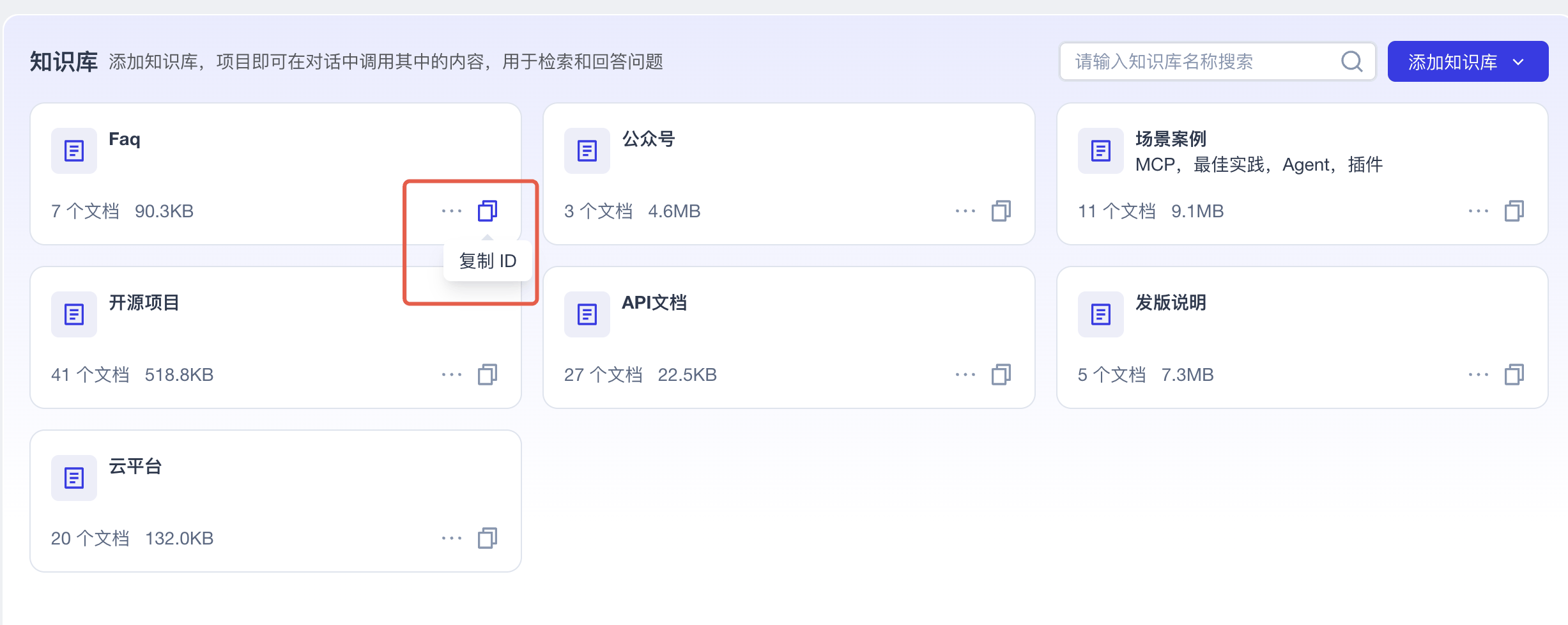
# Replace with your own knowledge base ID (this is an example only)
os.environ["KNOWLEDGE_BASE_IDS"] = json.dumps([
  "based540fb25-ddf1-4456-935b-41d901518e04"
])
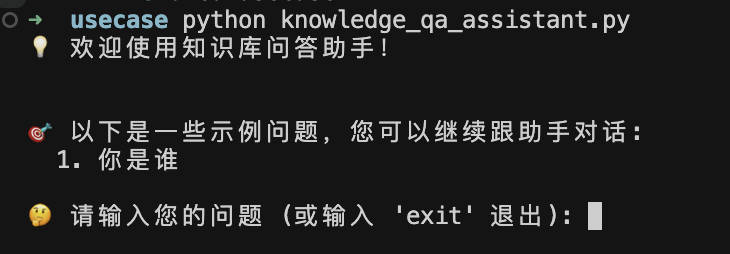
Execute the code
python knowledge_qa_assistant.py
2.3 Code walkthrough
- Set your MemOS API key, OpenAI API key, and knowledge base IDs via environment variables.
- Instantiate
KnowledgeBaseAssistant. - Use
main()to start an interactive chat loop. - The assistant calls
chat()to handle the interaction. Insidechat(), it performs:
- Call
get_messageto fetch historical chat messages. - Call
search_memoryto retrieve facts and preferences. - Build a prompt based on the memory system.
- Use the LLM to generate an answer.
- Call
add_messageto store the user query and model answer as long-term memory. - Return the model answer.