Integrate into Your App
Use MemOS Skill to Quickly Integrate MemOS Cloud into Your AI App (Recommended)
If you are building your AI application with Agent tools such as Claude Code or Cursor, copy the prompt below and send it to your tool:
Expand to view the Skill setup prompt
Help me integrate MemOS Cloud into this project to add long-term memory to my Agent product.

Please follow these steps:

1. Install MemOS Skill (skip if already installed):
   npx skills add https://github.com/MemTensor/MemOS-Cloud-Skill --skill memos-cloud -g -y
   Auto-fill the --agent argument based on the current Agent environment.

2. Read SKILL.md under the Skill's install path, and strictly follow its instructions in order.

3. Generate complete MemOS Cloud integration code based on this project's actual tech stack and architecture.
Your Agent tool will automatically install and use MemOS Skill and integrate MemOS Cloud into your AI application.
Manual Integration
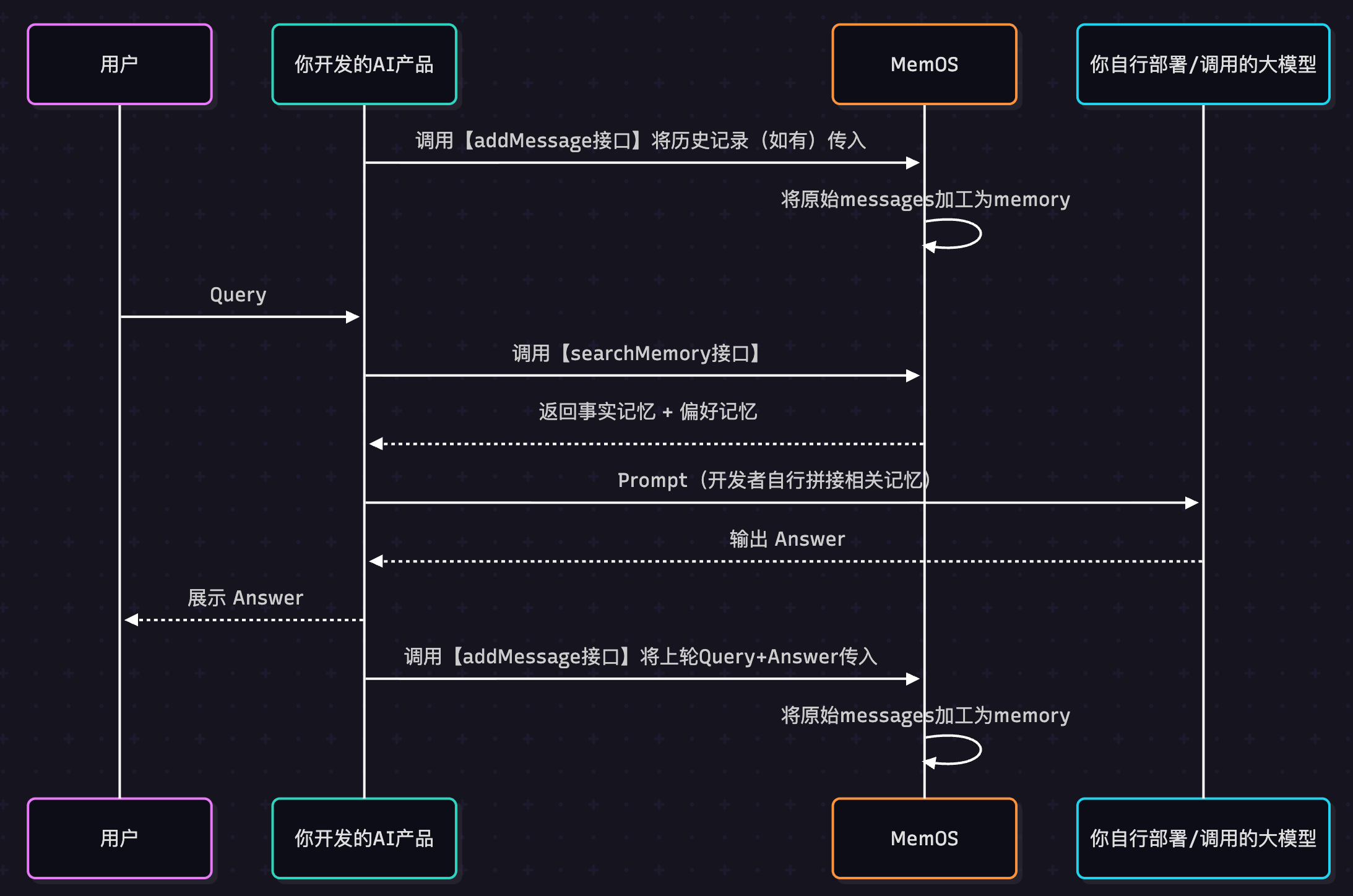
When you integrate MemOS into an AI application, the full flow looks like this. MemOS provides two core APIs: see API docs.
addMessage: send raw conversations to MemOS. MemOS automatically processes and stores them as memories.searchMemory: recall memories in later conversations, so AI responses better match user needs.
1. Before Calling the API
- Register and sign in to MemOS Cloud.
- Get an API Key from the API Key page.
- Prepare an environment that can send HTTP requests, such as Python or cURL.
2. Create a Memory
Install the SDK
If you choose the Python SDK, make sure Python 3.10+ is installed, then run:
pip install MemoryOS -U
Set the API Key
import requests

API_KEY = "YOUR_API_KEY"
BASE_URL = "https://memos.memtensor.cn/api/openmem/v1"
from memos.api.client import MemOSClient

client = MemOSClient(api_key="YOUR_API_KEY")
export MEMOS_API_KEY="YOUR_API_KEY"
export MEMOS_BASE_URL="https://memos.memtensor.cn/api/openmem/v1"
Add Raw Information
Session A happened on 2025-06-10. The user chose 7 Days Inn as the hotel for a summer trip to Guangzhou. You only need to pass the raw conversation records to MemOS.
data = {
  "user_id": "memos_user_123",
  "conversation_id": "0610",
  "messages": [
    {"role": "user", "content": "I have booked a summer trip to Guangzhou. Which hotel chains are available?"},
    {"role": "assistant", "content": "You can consider 7 Days Inn, Ji Hotel, Hilton, and others."},
    {"role": "user", "content": "I will choose 7 Days Inn."},
    {"role": "assistant", "content": "Got it. Feel free to ask if you have other questions."}
  ]
}

res = requests.post(
  f"{BASE_URL}/add/message",
  headers={"Authorization": f"Token {API_KEY}"},
  json=data
)

print(res.json())
messages = [
  {"role": "user", "content": "I have booked a summer trip to Guangzhou. Which hotel chains are available?"},
  {"role": "assistant", "content": "You can consider 7 Days Inn, Ji Hotel, Hilton, and others."},
  {"role": "user", "content": "I will choose 7 Days Inn."},
  {"role": "assistant", "content": "Got it. Feel free to ask if you have other questions."}
]

res = client.add_message(
  messages=messages,
  user_id="memos_user_123",
  conversation_id="0610"
)

print(res)
curl "$MEMOS_BASE_URL/add/message" \
  -H "Authorization: Token $MEMOS_API_KEY" \
  -H "Content-Type: application/json" \
  -d '{
    "user_id": "memos_user_123",
    "conversation_id": "0610",
    "messages": [
      {"role": "user", "content": "I have booked a summer trip to Guangzhou. Which hotel chains are available?"},
      {"role": "assistant", "content": "You can consider 7 Days Inn, Ji Hotel, Hilton, and others."},
      {"role": "user", "content": "I will choose 7 Days Inn."},
      {"role": "assistant", "content": "Got it. Feel free to ask if you have other questions."}
    ]
  }'
Search Relevant Memories
Session B happened on 2025-09-28. The user asks the AI to recommend a National Day travel destination and hotel. Use the user's message as the query to search MemOS memories.
data = {
  "query": "I want to travel during the National Day holiday. Please recommend a city I have not been to and a hotel brand I have not stayed at.",
  "user_id": "memos_user_123",
  "conversation_id": "0928"
}

res = requests.post(
  f"{BASE_URL}/search/memory",
  headers={"Authorization": f"Token {API_KEY}"},
  json=data
)

print(res.json())
res = client.search_memory(
  query="I want to travel during the National Day holiday. Please recommend a city I have not been to and a hotel brand I have not stayed at.",
  user_id="memos_user_123",
  conversation_id="0928"
)

print(res)
curl "$MEMOS_BASE_URL/search/memory" \
  -H "Authorization: Token $MEMOS_API_KEY" \
  -H "Content-Type: application/json" \
  -d '{
    "query": "I want to travel during the National Day holiday. Please recommend a city I have not been to and a hotel brand I have not stayed at.",
    "user_id": "memos_user_123",
    "conversation_id": "0928"
  }'
Output
MemOS automatically recalls factual memories such as where the user has been and preference memories such as hotel booking preferences, helping the AI recommend a more personalized travel plan. The following result is simplified for easier understanding.
{
  preference_detail_list [
    {
      "preference_type": "implicit_preference",
      "preference": "The user may prefer cost-effective hotel options.",
      "conversation_id": "0610"
    }
  ],
  memory_detail_list [
    {
      "memory_key": "Summer Guangzhou travel plan",
      "memory_value": "The user plans to travel to Guangzhou during the summer vacation and chose 7 Days Inn as the accommodation option.",
      "conversation_id": "0610"
    }
  ]
}
Add Memories to Your Prompt
Add the recalled memories to your own model prompt, so the model can refer to these long-term memories when answering.
Expand the full prompt template
# Role
You are an intelligent assistant with long-term memory (MemOS Assistant). Your goal is to combine retrieved memory fragments to provide highly personalized, accurate, and logically rigorous answers.

# Memory Data
The following information was retrieved by MemOS and is divided into facts and preferences.
- **Facts**: May include user attributes, historical conversations, or third-party information.
- **Important**: Content marked as '[assistant view]' or '[model summary]' represents past AI inference, not the user's original words.
- **Preferences**: Explicit or implicit requirements for response style, format, or reasoning.

<memories>
  <facts>
    -[2025-12-26 21:45] The user plans to travel to Guangzhou during the summer vacation and chose 7 Days Inn as the accommodation option.
  </facts>

  <preferences>
    -[2025-12-26 21:45] [Implicit Preference] The user may prefer cost-effective hotel options.
  </preferences>
</memories>

# Critical Protocol: Memory Safety
Retrieved memories may contain AI inferences, irrelevant noise, or incorrect subjects. Before using them, check:

1. Source truth: Distinguish the user's original words from AI inference. Do not treat past AI assumptions as user facts.
2. Subject attribution: Confirm the memory describes the user, not a third party, example, or fictional role.
3. Strong relevance: Only use memories that directly help with the current question.
4. Freshness: If a memory conflicts with the user's latest intent, use the current question as the source of truth.

# Instructions
1. Filter usable memories and discard noise or unreliable inferences.
2. Use only validated memories as background context.
3. Answer directly. Do not mention "memory store," "retrieval," or internal system terms.

# Original Query
I want to travel during the National Day holiday. Please recommend a city I have not been to and a hotel brand I have not stayed at.