Continuous Conversation Chat
1. When to Use the Chat API
The Chat API is suitable for quickly building AI conversation applications with long-term memory. You only pass the user's current message; MemOS automatically handles memory recall, prompt assembly, model response generation, and conversation writing.
- Integrated conversational AI: one API completes conversation generation without a complex custom pipeline.
- Automatic memory handling: automatically extracts, updates, and retrieves memories, reducing manual maintenance.
- Continuous context: keeps understanding coherent across turns, days, and even sessions.
2. Compared with Memory Operation APIs
Use Chat
Best for general AI conversations, business PoCs, and quick validation
Use Memory Operation APIs
Best for complex Agents and deeper business-system integration
| Dimension | Chat API | Memory operation APIs |
|---|---|---|
| Integration complexity | Low, ready to use | Medium, requires orchestration |
| Memory management | Automatic | Manually add, search, and assemble |
| Model response | Generated by MemOS built-in model | Call your own external model |
| Control | Good for common configuration | Good for complex pipelines and fine-grained control |
3. How It Works
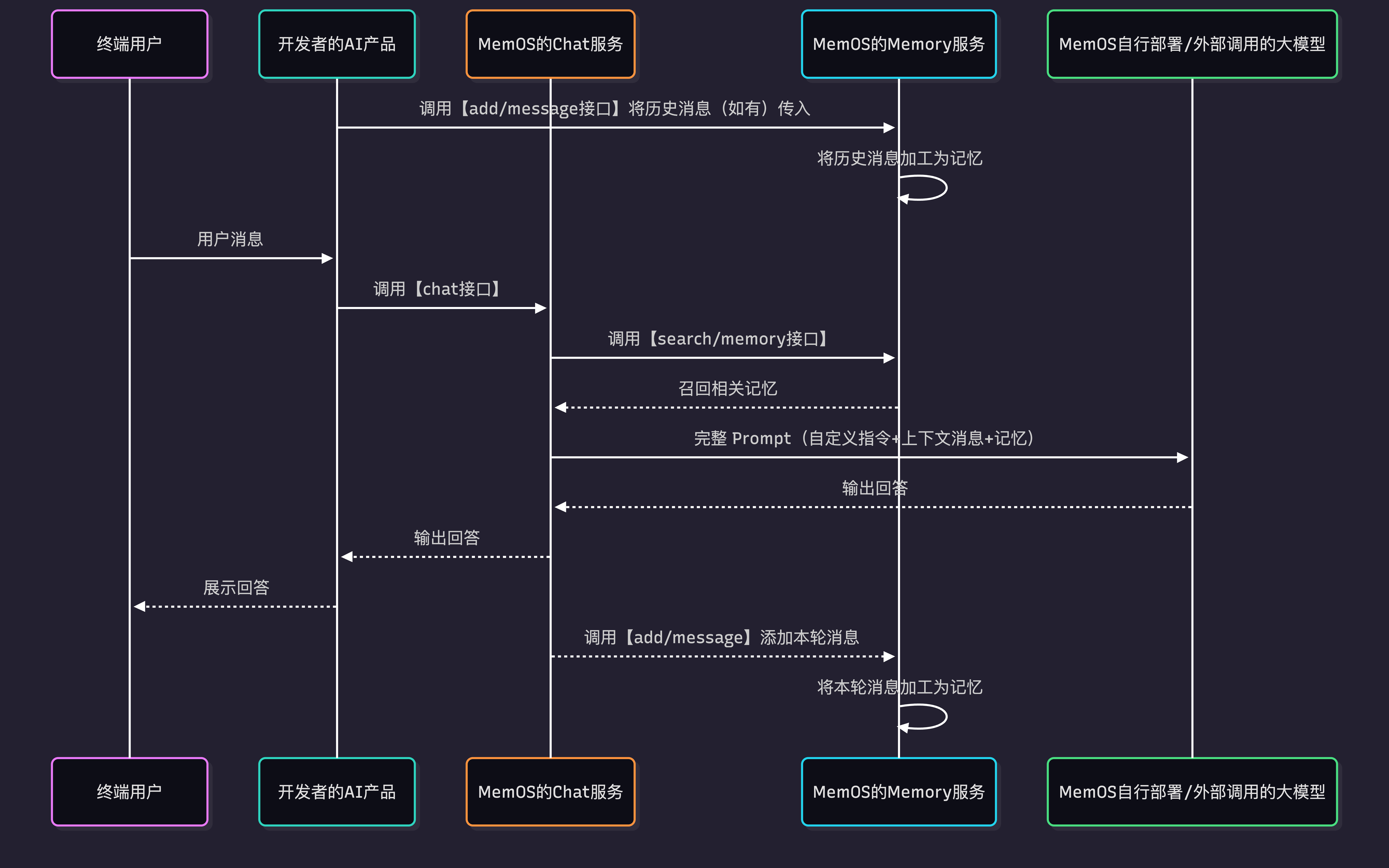
- If historical user messages exist, call
add/messageto write them into MemOS first. - When the end user sends a message, your AI application calls
chatwith the user message and related parameters. - MemOS recalls historical memories related to the current user message and assembles custom instructions, current conversation context, and user memories.
- MemOS calls the model to generate an answer and returns the result to your AI application.
- By default, MemOS asynchronously processes the user message and model response in the background and writes them as memories.
4. Quick Start
Optional: add historical messages
If you already have conversation history, call add/message first. For a new user or a new conversation, skip this step and call Chat directly.
import requests

API_KEY = "YOUR_API_KEY"
BASE_URL = "https://memos.memtensor.cn/api/openmem/v1"

data = {
  "user_id": "memos_user_123",
  "conversation_id": "0610",
  "messages": [
    {"role": "user", "content": "I booked a summer trip to Guangzhou. Which hotel chains are available?"},
    {"role": "assistant", "content": "You can consider 7 Days Inn, Ji Hotel, Hilton, and others."},
    {"role": "user", "content": "I'll choose 7 Days Inn."},
    {"role": "assistant", "content": "Got it. Feel free to ask if you have other questions."}
  ]
}

res = requests.post(
  f"{BASE_URL}/add/message",
  headers={"Authorization": f"Token {API_KEY}"},
  json=data
)

print(res.json())
from memos.api.client import MemOSClient

client = MemOSClient(api_key="YOUR_API_KEY")

messages = [
  {"role": "user", "content": "I booked a summer trip to Guangzhou. Which hotel chains are available?"},
  {"role": "assistant", "content": "You can consider 7 Days Inn, Ji Hotel, Hilton, and others."},
  {"role": "user", "content": "I'll choose 7 Days Inn."},
  {"role": "assistant", "content": "Got it. Feel free to ask if you have other questions."}
]

res = client.add_message(
  messages=messages,
  user_id="memos_user_123",
  conversation_id="0610"
)

print(res)
Call Chat
When you call chat, MemOS automatically retrieves relevant memories and generates an answer.
import requests

API_KEY = "YOUR_API_KEY"
BASE_URL = "https://memos.memtensor.cn/api/openmem/v1"

data = {
  "user_id": "memos_user_123",
  "conversation_id": "0928",
  "query": "I want to travel during National Day. Recommend a city I have not visited and a hotel brand I have not stayed at."
}

res = requests.post(
  f"{BASE_URL}/chat",
  headers={"Authorization": f"Token {API_KEY}"},
  json=data
)

print(res.json())
from memos.api.client import MemOSClient

client = MemOSClient(api_key="YOUR_API_KEY")

res = client.chat(
  user_id="memos_user_123",
  conversation_id="0928",
  query="I want to travel during National Day. Recommend a city I have not visited and a hotel brand I have not stayed at."
)

print(res)
curl --request POST \
  --url https://memos.memtensor.cn/api/openmem/v1/chat \
  --header 'Authorization: Token YOUR_API_KEY' \
  --header 'Content-Type: application/json' \
  --data '{
    "user_id": "memos_user_123",
    "conversation_id": "0928",
    "query": "I want to travel during National Day. Recommend a city I have not visited and a hotel brand I have not stayed at."
  }'
For the full field list, request format, and response format, see the Chat API documentation.
5. Limits
- Input limit: 8,000 tokens.
- Output limit: up to 25 fact memories and up to 25 preference memories can be recalled.
6. More Usage Options
The Chat API works out of the box. The following parameters are optional and only needed when you want to control memory recall, model responses, or memory writing.
Control memory recall scope
Use these fields to control which memories are considered and how many are recalled:
filter: filter memories by tags, time, business fields, and other conditions.knowledgebase_ids: specify which knowledge bases Chat can search.relativity: control the relevance threshold for recalled memories.memory_limit_number: limit the number of fact memories passed to the model.
data = {
  "user_id": "memos_user_123",
  "conversation_id": "0928",
  "query": "Use the knowledge base to summarize travel reimbursement rules.",
  "knowledgebase_ids": ["kb_xxx"],
  "filter": {
    "and": [
      {"tags": {"contains": "travel"}},
      {"create_time": {"gte": "2025-01-01"}}
    ]
  },
  "relativity": 0.8,
  "memory_limit_number": 9
}
Control model response behavior
Use these fields to specify the model, enable streaming, or adjust generation parameters:
model_name: specify the conversation model.stream: control whether to stream the response.temperature: control randomness.top_p: control candidate token selection.max_tokens: limit the maximum generated length.
data = {
  "user_id": "memos_user_123",
  "conversation_id": "0928",
  "query": "Summarize my travel preferences in a concise tone.",
  "model_name": "qwen2.5-72b-instruct",
  "stream": False,
  "temperature": 0.7,
  "top_p": 0.95,
  "max_tokens": 1024
}
To fully customize model behavior, pass system_prompt to override the default system prompt.
Control whether new memories are written automatically
By default, Chat writes the current user message and model response into memory. If you only want to generate an answer and do not want this turn to enter memory processing, pass:
add_message_on_answer: whether to write this user message and model response into memory.
data = {
  "user_id": "memos_user_123",
  "conversation_id": "0928",
  "query": "Answer this once, but do not write this turn into memory.",
  "add_message_on_answer": False
}
For ordinary conversations, you can ignore these fields. When you want new memories generated by Chat to carry business ownership or control where they are written, use:
agent_id: mark which Agent the conversation belongs to.app_id: mark which application the conversation comes from.tags: add tags for future retrieval and filtering.info: write custom business metadata such as scene, order ID, or status.allow_public: whether to allow writing to project-level public memory.allow_knowledgebase_ids: which knowledge bases can be written.
7. Common Errors and Troubleshooting
| Error Code | Common Cause | How to Fix |
|---|---|---|
40000 | The request JSON structure is invalid, or a field type is incorrect | Check whether query is a string, filter is an object, and knowledgebase_ids / allow_knowledgebase_ids are string arrays |
40002 | A required field is empty | Check that user_id, conversation_id, and query are all provided and non-empty |
40010 | user_id is too long | Use a stable and shorter end-user ID. The length cannot exceed 100 characters |
40011 | conversation_id is too long | Use a short conversation ID. Do not put full conversations, user input, or JSON into conversation_id |
40301 / 40305 | Input content or request tokens exceed the limit | Shorten query, system_prompt, and filter conditions. Do not put long documents directly into the Chat request |
40302 / 40303 | Generated content or chat length exceeds the model limit | Lower max_tokens, shorten the expected output, or split the request into multiple turns |
50123 | The knowledge base is not associated with the current project | Go to Project Configuration and confirm the knowledge base is associated with the project that owns the API Key |
50144 | Message writing after the Chat response failed | If add_message_on_answer is enabled, check the request content and retry later. If it persists, contact support |
For more error code details, see Error Codes.
For the full field list, request format, and response format, see the Chat API documentation.