Cloud Plugin
The Cloud Plugin now supports DeepSeek Harness. Through DSH's native lifecycle mechanism, DSH gets long-term cloud memory.
OpenClaw's going viral lately. But if you've actually used it for a while, you'll find two issues you can hardly avoid:
- Tokens burn way too quickly:OpenClaw can handle many long-tail tasks, but the cost is that each run consumes a huge number of tokens. When you have it monitoring your screen, running scheduled tasks, or handling complex workflows, the token consumption is painfully fast.
("u know token is money🫠")
- Its memory function is rather poor:Many claim OpenClaw's memory outperforms ChatGPT. Yet in practice, you'll find it does retain some information—but often not what you need. Crucial preferences may be forgotten, while trivial chatter is remembered in vivid detail.
("can u please remember something really matter to me???")
This tutorial guides you through using the MemOS OpenClaw plugin to figure out these 3 pain issues:
- Significantly reduce token consumption — intelligently retrieve relevant memories without indiscriminately loading all history
- Make memories genuinely useful — professional memory categorisation and management, remembering what should be retained and forgetting what should be discarded
- Preserve OpenClaw's core strengths — cross-device control, proactive interaction, and human-like experience remain intact
Why is OpenClaw now a Token Killer🥷?
Issues with OpenClaw
1st convo: 500 tokens
2nd convo: 500 + 800 = 1,300 tokens
3rd convo: 1,300 + 600 = 1,900 tokens
10th convo: 10,000+ tokens
When you have OpenClaw monitoring your screen, performing executive tasks, and running on a schedule, this figure increases even more rapidly.
Three critical points in OpenClaw's native memory management
OpenClaw's memories reside in local .md files, categorised as global memories and daily memories. While this sounds promising, practical use reveals three unavoidable issues:
1. Global memories become booming
As global memories accumulate, context overload ensues. Moreover, these memories persistently interfere with current conversations. You might simply wish to ask a straightforward question, yet it dredges up every utterance from three months prior.
2. Daily memory recall proves difficult
Accumulating daily memories invariably makes retrieval cumbersome. To recall yesterday's activities, one must undergo an additional retrieval process. Maintaining cross-session memory becomes nearly impossible.
3. Memory relies on the model's proactive logging
OpenClaw's memory system relies on the model to log information itself, rather than automatic logging. This means it frequently misses details—you mention something, and it promptly forgets.
I've encountered this several times myself: I'd explicitly emphasised a particular project configuration, yet when restarting the conversation the next day, it had no recollection whatsoever, requiring me to explain it all over again.
OpenClaw vs OpenClaw + MemOS: Memory Solution Comparison
OpenClaw Native Memory Solution
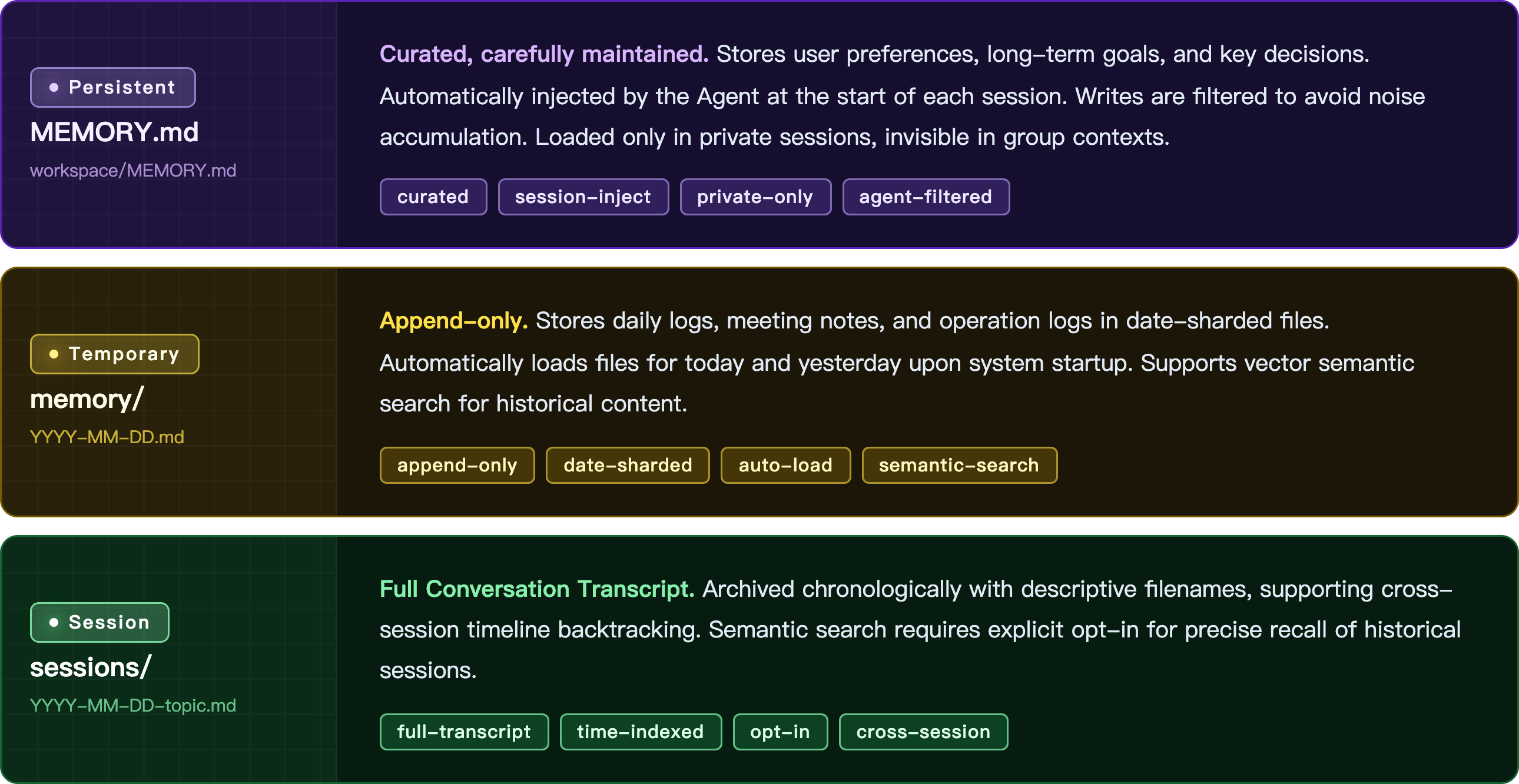
Memory Storage Solution
Core Philosophy: File is Truth — Abandoning opaque vector databases in favor of Markdown files as the core carrier of memory.
Memory Retrieval Solution: Dual-Engine Drive
| Engine | Technology | Features |
|---|---|---|
| Vector Search | Cosine Similarity | Captures semantic associations, excels at "concept matching", e.g., associating "login flow" with "authentication" |
| BM25 Search (Lexical Matching) | FTS5-based lexical matching | Handles "exact tokens", such as error codes, function names, or specific IDs |
Retrieval Trigger: Triggered via Prompt, model decides automatically
Weighted Score Fusion: Score = (0.7 * VectorScore) + (0.3 * BM25Score)
Pain Points of Existing Solutions
- Rudimentary Retrieval Algorithms: Unstable recall, weak relevance, Agent repeats trial and error, Token accumulates rapidly
- Excessive Context Injection: Fixed reading of today + yesterday + long-term memory, high proportion of invalid context
- Lack of Structure and Deduplication in Memory: Tool call long outputs are written directly and re-transmitted repeatedly, costs snowball
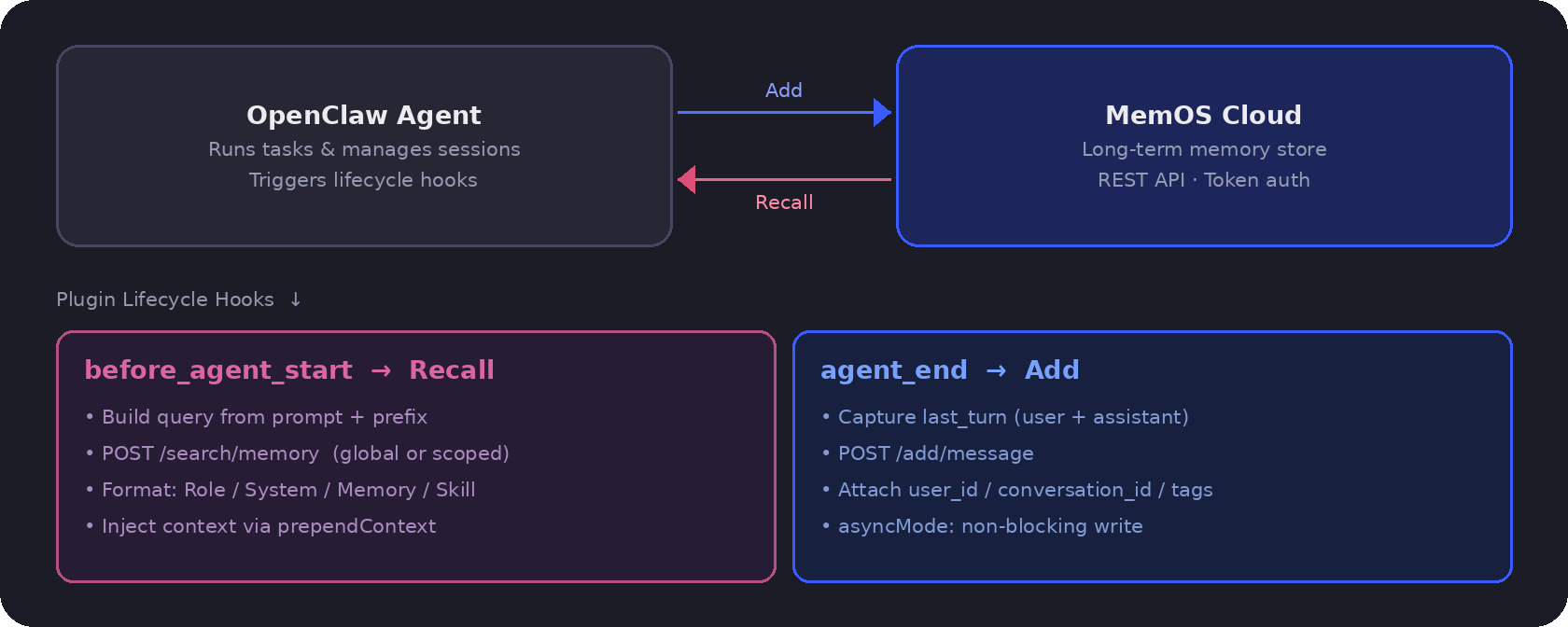
OpenClaw + MemOS Memory Solution
Three Core Effects
Effect 1: Controllable Token Costs 💰
From "Full Context Stuffing" to "Precise Recall per Task"
OpenClaw no longer stuffs today+yesterday+long-term memory every time. Instead, MemOS retrieves the most relevant few memories based on the current task (recall budget/count can be set), significantly reducing the proportion of invalid context and avoiding Token snowballing.
Effect 2: More Stable and Accurate Retrieval 🎯
Reduce repeated trial and error and re-asking, improve one-shot hit rate
MemOS provides stronger memory organization and retrieval capabilities (structured, hierarchical/multi-granular, semantic retrieval + rule filtering, etc.), making OpenClaw's recalled content more relevant and stable, reducing repeated reasoning and confirmation caused by "unstable recall".
Effect 3: Cleaner and More Usable Memory ✨
Structured + Deduplicated + High Compression, avoiding "Long Output Pollution"
Long outputs from tool calls (such as traversal results, config/schema, etc.) are not written back to the context verbatim repeatedly; MemOS can summarize/compress, deduplicate, and archive, making it "cleaner" over long-term operation, with memory quality improving rather than deteriorating over time.
After integrating the MemOS OpenClaw plugin👇🏻
- ✅ Retrieve only 3–5 relevant memories at a time
- ✅ Maintain context stability within 2,000–3,000 tokens
- ✅ Cost remains manageable regardless of dialogue length
MemOS plugins can enhance your OpenClaw
| Feature | Description |
|---|---|
| Automatically remember all conversations | without relying on models to actively log, ensuring no critical information is missed |
| Precise recall | retrieve relevant memories based on current task intent, avoiding irrelevant historical data |
| Remember user preferences | categorise and store preference information specifically, remaining effective across sessions |
MemOS OpenClaw has restructured the token consumption model, transforming costs from a ‘historical length function’ into a ‘task relevance function’. Your local OpenClaw costs become manageable, and the system operates more stably.
Quick Start
Three steps to boost your Agent with basic memory capabilities.
1. Install OpenClaw
Ensure that the OpenClaw environment is installed on your system:
# Install the newest version
npm install -g openclaw@latest

# Initialize and configure startup
openclaw onboard
2. Get and configure your API Key
2.1 Get your Key
Log in to or register with MemOS Cloud to get your API Key 🔗 MemOS Cloud
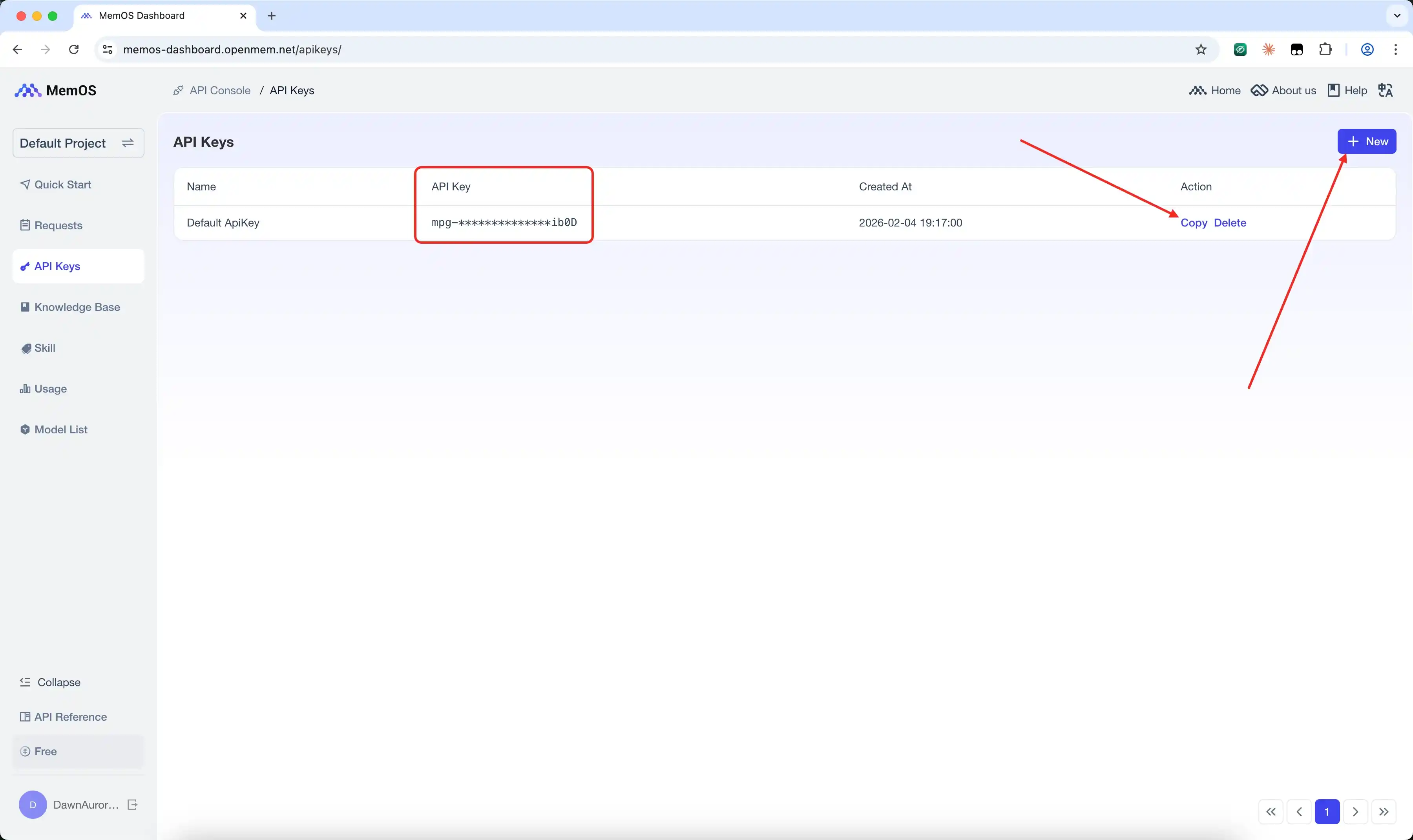
2.2 Set Environment Variables
The plugin tries env files in order (openclaw → moltbot → clawdbot). For each key, the first file with a value wins. If none of these files exist (or the key is missing), it falls back to the process environment.
Where to configure
- Files (priority order):
~/.openclaw/.env~/.moltbot/.env~/.clawdbot/.env
- Each line is
KEY=value
Quick setup (shell)
echo 'export MEMOS_API_KEY="mpg-..."' >> ~/.zshrc
source ~/.zshrc
# or

echo 'export MEMOS_API_KEY="mpg-..."' >> ~/.bashrc
source ~/.bashrc
Quick setup (Windows PowerShell)
[System.Environment]::SetEnvironmentVariable("MEMOS_API_KEY", "mpg-...", "User")
If MEMOS_API_KEY is missing, the plugin will warn with setup instructions and the API key URL.
Minimal config
MEMOS_API_KEY=YOUR_TOKEN
3. Install Plugins
Option A — NPM (Recommended)
openclaw plugins install @memtensor/memos-cloud-openclaw-plugin@latest
openclaw gateway restart
Note for Windows Users: If you encounter Error: spawn EINVAL, this is a known issue with OpenClaw's plugin installer on Windows. Please use Option B (Manual Install) below.
Make sure it’s enabled in ~/.openclaw/openclaw.json:
{
  "plugins": {
    "entries": {
      "memos-cloud-openclaw-plugin": { "enabled": true }
    }
  }
}
Option B — Manual Install (Workaround for Windows)
- Download the latest
.tgzfrom NPM. - Extract it to a local folder (e.g.,
C:\Users\YourName\.openclaw\extensions\memos-cloud-openclaw-plugin). - Configure
~/.openclaw/openclaw.json(or%USERPROFILE%\.openclaw\openclaw.json):
{
  "plugins": {
    "entries": {
      "memos-cloud-openclaw-plugin": { "enabled": true }
    },
    "load": {
      "paths": [
        "C:\\Users\\YourName\\.openclaw\\extensions\\memos-cloud-openclaw-plugin\\package"
      ]
    }
  }
}
Restart the gateway after config changes.
4. Update Plugin
You can manually update the cloud plugin to the latest version using the following commands:
openclaw plugins update @memtensor/memos-cloud-openclaw-plugin@latest
openclaw gateway restart
DeepSeek Harness Setup
The cloud plugin connects through DSH's native lifecycle. Before the first model step of each turn, it retrieves relevant memories from MemOS Cloud. After the turn succeeds, it writes the user and assistant messages back. You do not need to change DSH core code. If cloud memory is temporarily unavailable, the current DSH task still continues.
Use the same API Key created above. You do not need to create another one.
1. Install the cloud plugin into the default DSH web profile
npx @deepseek-ai/dsh plugin --profile web add @memtensor/memos-cloud-dsh-plugin@latest
Install, removal, and version management stay on DSH's official plugin mechanism.
2. Configure the API Key and User ID in ~/.dsh/.env (Recommended)
Create or edit ~/.dsh/.env:
MEMOS_API_KEY=mpg-your-key
MEMOS_USER_ID=your-stable-user-id
MEMOS_USER_ID identifies the user's memories for both recall and add. Use a stable, distinct ID for each user. The default is deepseek-harness-user. When upgrading, keep your existing ID; if you previously used the default, set it to deepseek-harness-user to keep accessing those memories.
Upgrading an older configuration to 0.1.1: If you previously placed MEMOS_API_KEY at the top level of .credentials.yaml, move the key to .env as shown above, or use the credential format below.
Alternatively, store the API Key under refs in ~/.dsh/.credentials.yaml. The following example is for a new file. When editing an existing file, merge the key into its refs mapping and preserve other credentials and records:
version: 1
refs:
  MEMOS_API_KEY: mpg-your-key
records: {}
With the credentials file, configure the user ID through MEMOS_USER_ID in .env or memos-cloud.userId in settings.yaml.
3. Add the minimal config to ~/.dsh/settings.yaml
memos-cloud:
  apiKeyEnv: MEMOS_API_KEY
Set apiKeyEnv to the credential name and store the actual key in .env or .credentials.yaml. Configure ordinary options such as baseURL, recall, and add in settings.yaml.
For options with multiple supported sources, precedence is highest first: values set directly in settings.yaml → inherited process environment → credentials in .credentials.yaml → launch-directory .env → ~/.dsh/.env → plugin defaults. The credentials file applies only to the API Key. If DSH still uses an old key after an update, check the higher-priority sources.
4. Restart DSH Web
DSH loads .env at startup. After changing the configuration, press Ctrl+C in the terminal running DSH, then start it again:
npx @deepseek-ai/dsh web
After that, DSH retrieves relevant cloud memory before each task, and writes new context back after a successful turn.
For all configuration options and compatibility details, see the DSH plugin README.
Advanced Configuration for Open-Source Projects
If you wanna unlock further possibilities, you may explore and configure additional features via the MemOS GitHub project!
Visual Configuration UI (Config UI)
Starting from version v0.1.12, the Cloud Plugin features a built-in local visual configuration service, allowing you to manage and modify plugin settings more intuitively.
How to access:
- Start your OpenClaw node or host gateway.
- Once the plugin is successfully loaded and detects that the gateway is ready, it will automatically start the Config UI service in the background.
- An access link will be printed in the terminal console logs (the default URL is typically
http://127.0.0.1:38463). - Open this link in your browser to access the plugin's visual management backend.
Features:
- Intuitive Editing: Supports form-based editing of all core configurations (such as Knowledge Base IDs, LLM retrieval parameters, multi-agent override rules, etc.).
- Real-time Synchronization: Configuration changes saved via the interface take effect immediately during plugin runtime, without requiring a service restart.
- Status Monitoring: The interface provides heartbeat detection with the host gateway to ensure the configuration synchronization link is healthy.
Multi-Agent Support & Isolation
The plugin provides powerful native support for multi-agent architectures (via the agent_id parameter), making it ideal for complex workflows or team agent scenarios.
1. Enable & Data Isolation
- How to enable: Set
"multiAgentMode": truein the config or configure the environment variableMEMOS_MULTI_AGENT_MODE=true. - Automatic Isolation: When enabled, the plugin automatically reads
ctx.agentIdfrom the context. This Agent identifier is attached to memory retrieval and writing, ensuring complete data isolation between different Agents under the same user (Note: the default"main"Agent is ignored to maintain legacy data compatibility).
2. Memory Switch per Agent (Whitelist Control)
In Multi-Agent mode, if you do not want all Agents to consume memory, you can use allowedAgents to precisely control the whitelist:
{
  "plugins": {
    "entries": {
      "memos-cloud-openclaw-plugin": {
        "enabled": true,
        "config": {
          "multiAgentMode": true,
          "allowedAgents": ["research-agent", "coding-agent"]
        }
      }
    }
  }
}
(Tip: 1. If allowedAgents is not configured or is an empty array [], it means all Agents are allowed to use memory retrieval and writing. 2. If it is configured, Agents not in the configuration will be completely skipped, and only the configured Agents will be effective for memory retrieval and writing, thereby avoiding Token waste.)
3. Per-Agent Configuration (agentOverrides)
Beyond simple toggles, you can use agentOverrides to configure different memory parameters for each Agent. For example, giving a research assistant a looser retrieval threshold, while restricting a coding assistant to read only a specific codebase knowledge base:
{
  "plugins": {
    "entries": {
      "memos-cloud-openclaw-plugin": {
        "enabled": true,
        "config": {
          "multiAgentMode": true,
          "allowedAgents": ["research-agent", "coding-agent"],
          "memoryLimitNumber": 6,
          "relativity": 0.45,

          "agentOverrides": {
            "research-agent": {
              "knowledgebaseIds": ["kb-research-papers"],
              "memoryLimitNumber": 12,
              "relativity": 0.3,
              "queryPrefix": "research context: "
            },
            "coding-agent": {
              "knowledgebaseIds": ["kb-codebase"],
              "memoryLimitNumber": 9,
              "addEnabled": false
            }
          }
        }
      }
    }
  }
}
(In the example above, memory writing is disabled for the coding-agent, and it can only retrieve the top 9 highly relevant memories from the kb-codebase knowledge base).
Deep customisation of environment variables
In addition to the required API Key, you may also adjust the plugin's behaviour via environment variables。
Further configuration details can be found in the MemTensor official plugin repo
Testing
Now, you can engage in multi-turn conversations with your Agent, for example:
First convo:
- "My favourite programming language is Python"
- "I'm developing an e-commerce project"
Second convo (new convo):
- "Do you recall which programming language I prefer?"
- "How is the project I mentioned previously progressing?"
Now, your OpenClaw will retrieve memories from MemOS Cloud and provide accurate responses ✅
Use with the CLI Tool
If you use OpenClaw alongside other Agents that can execute shell commands (e.g. Cursor, Codex, Claude Code), the MemOS CLI lets them all share the same memory space.
Install CLI and generate plugin-aware Skill
npm install -g @memtensor/memos-cloud-cli
memos init --agent openclaw --memos-plugin
--memos-plugin makes the generated Skill aware of the installed OpenClaw cloud plugin, avoiding duplicate memory writes.
Install Skill for other Agents
memos init --agent cursor
memos init --agent codex
Once installed, these Agents will also automatically search and write MemOS memories through the CLI, sharing the same memory space as OpenClaw.
Test whether the plugin and CLI work together
Return to OpenClaw and start a conversation that should produce long-term memory:
I am recently working on an e-commerce project, mainly using Python. Please remember this.
Then start a new conversation and ask:
What project am I working on recently? Which language am I mainly using?
If OpenClaw answers using the previous turn, the plugin has written and recalled memory successfully. The generated CLI Skill is also aware of the installed plugin, so it avoids duplicate memory writes.